UK V5C Logbook VIN Extraction API
Automate UK vehicle onboarding and compliance. Accurately extract the 17-character VIN (Chassis Number) directly from DVLA V5C registration certificates, bypassing complex colored watermarks and document creases.
200 free credits = 200 VIN scans, no credit card. Then from $5 for 500 credits, pay as you go. See pricing
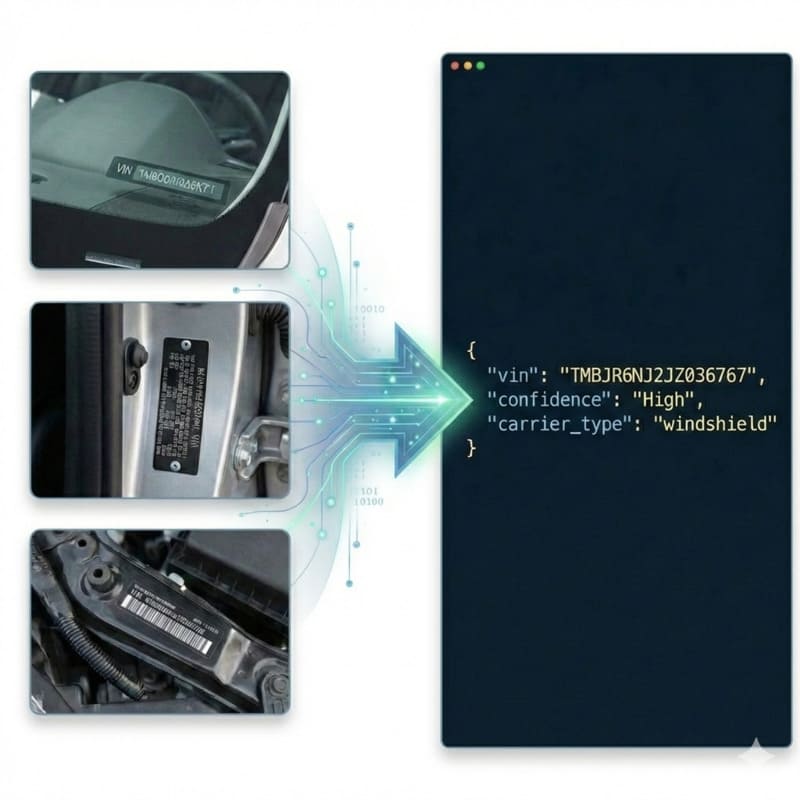
The Nuances of DVLA V5C Documents
Processing the UK's V5C logbook presents specific optical and structural challenges. First, the document utilizes strong, colored security background patterns (red, blue, or green depending on the issue year) designed to prevent forgery, which often confuse generic OCR tools. Second, as a physical booklet, user-submitted photos frequently feature deep folds, creases, and uneven lighting across the pages. Finally, the exact field label ('VIN/Chassis/Frame No.') is nestled within a dense tabular layout alongside engine numbers and registration details. For a deeper dive into how our API parses complex official forms, see the VIN OCR API.
StructOCR: Purpose-Built for V5C Layouts
StructOCR does not rely on rigid template matching, which breaks when a V5C is photographed at an angle or folded. Powered by our flagship Automotive VIN OCR API, it dynamically locates the 'Section 4: Vehicle Details' block. It applies advanced color-filtering to neutralize the DVLA security backgrounds and actively anchors to the 17-character sequence. By applying strict ISO 3779 validation, the engine guarantees the extracted text is a perfectly structured VIN, ready for instant database entry.
Live Demo: VIN Barcode Scanner
No registration required. Upload a file to test the extraction.
Drop files here or click to browse
JPG · PNG · PDF · TIFF · up to 500 files · max 4.5 MB each
Photograph the VIN plate at the bottom of the windshield or the label on the driver-side door jamb.
No document handy?
Core Industry Applications
UK Motor Insurance Onboarding
Allow policyholders to simply upload a photo of their V5C to instantly pre-fill quote applications, eliminating frustrating manual data entry. Get 200 free credits to test your own documents.To streamline your vehicle intake process without any integration, try capturing data effortlessly with our free VIN barcode scanner directly from your browser.
Used Car Dealership HPI Checks
Sales teams can scan the V5C logbook via tablet or smartphone to instantly trigger automated HPI background and finance checks.
Scrap & Salvage (ATF) Processing
Authorized Treatment Facilities (ATFs) can quickly log ELV (End of Life Vehicles) by scanning the V5C before issuing a Certificate of Destruction.
Fleet Tax & Compliance
Automate the digitization of V5C documents for large corporate fleets, instantly syncing the correct VINs for road tax (VED) renewals.
Technical Specs
- Background Neutralization: Specifically handles DVLA red/blue/green patterned watermarks
- Validation: Built-in ISO 3779 rules & Length constraint (strictly 17 chars)
- Latency: < 1.2s per document via API
- Data Privacy: Images kept for at most 24 hours for quality spot-checks, then deleted (SOC 2 Type II)
Key Features
- Crease & Fold Correction: Automatically normalizes text distortion caused by scanning folded paper booklets.
- Field Isolation: Intelligently distinguishes the VIN from nearby Engine Numbers and Registration Marks (VRM).
- Format Support: Accepts raw Base64 or Data URIs (JPG, PNG, WebP up to 4.5MB).
Integration & AI Prompts
Call the endpoint directly via our REST API, or copy the prompt below into your preferred AI coding assistant.
import requests
import base64

# Get 200 free credits:
# 👉 https://structocr.com/register

# 1. Prepare Base64 Image
with open("v5c_logbook.jpg", "rb") as image_file:
    base64_image = base64.b64encode(image_file.read()).decode('utf-8')

url = "https://api.structocr.com/v1/vin"
headers = {
    "x-api-key": "YOUR_API_KEY",
    "Content-Type": "application/json"
}
payload = {
    "img": base64_image
}

try:
    print("Scanning V5C Logbook...")
    response = requests.post(url, headers=headers, json=payload)
    result = response.json()

    if result.get('success'):
        data = result['data']
        print("✅ Extraction Successful!")
        print(f"VIN:          {data.get('vin')}")
        print(f"Confidence:   {data.get('confidence')}")
        print(f"Carrier Type: {data.get('carrier_type')}")
    else:
        print(f"❌ Extraction Failed: {result.get('error')} - {result.get('message')}")

except Exception as e:
    print(f"An error occurred: {e}")
Standardized JSON Output
The API returns a clean, structured payload containing the validated 17-character VIN, structural confidence, and identifies the carrier as a document.
{
  "success": true,
  "data": {
    "vin": "SAJAA13PX4B123456",
    "confidence": "High",
    "carrier_type": "document"
  }
}
Frequently Asked Questions
Does the API require the V5C to be scanned flat on a scanner?
No. Our engine is optimized for mobile uploads. It can accurately extract the VIN from photos taken at an angle, under uneven lighting, or with visible creases across the page.
How does it handle the colored background patterns on the V5C?
StructOCR applies deep-learning pre-processing to filter out the high-frequency colored noise (guilloche patterns) used by the DVLA, leaving only the high-contrast alphanumeric text for extraction.
Will it confuse the VIN with the Engine Number?
No. Our visual grounding models use spatial intelligence and ISO 3779 checksum logic. Even if the labels are obscured, the engine mathematically verifies which string is the true 17-character VIN.
Explore More Automotive VIN OCR Solutions
Universal VIN OCR API Solution
Our flagship API for automated vehicle identification. Works across windshields, documents, and physical plates, with check-digit validation.
Vietnam Vehicle Registration VIN OCR API
Extract 17-character VINs (Số khung) from Vietnamese registration cards. High-accuracy OCR engineered to handle red stamps, moiré patterns, and screen captures.
Windshield VIN OCR API
Extract 17-character VINs directly from vehicle windshields. High-accuracy OCR that automatically filters out severe glass glare, reflections, and dirt.
Arabic Vehicle Registration VIN OCR API
Extract 17-character VINs (Chassis Numbers) from Arabic registration cards. High-accuracy OCR featuring ISO 3779 validation and auto-correction.
Auction Window Sticker VIN OCR API
Extract 17-character VINs from inventory tags placed behind vehicle windshields. High-accuracy OCR that ignores massive lot numbers and filters out glass reflections.
Auto Auction Sticker VIN OCR API
Extract 17-character VINs from barcode-bearing auto auction windshield stickers and dealership inventory tags, despite lot numbers, glare, and faded thermal print.
Auto Insurance Policy VIN OCR API
Extract 17-character VINs from highly variable auto insurance policies and ID cards. Template-free OCR that handles unstructured layouts and scanned faxes.
Auto Repair Invoice VIN OCR API
Extract 17-character VINs from auto repair orders and shop invoices. High-accuracy OCR that handles thermal paper, grease stains, and unstructured layouts.
Auto Transport BoL VIN OCR API
Extract multiple 17-character VINs simultaneously from vehicle transport Bills of Lading (BoL). High-accuracy OCR that parses dense logistics tables.
Cyrillic Vehicle Registration OCR API
Extract 17-character VINs from Cyrillic vehicle documents (like Russian STS). Advanced OCR eliminates visual homoglyph confusion between Cyrillic and Latin alphabets.
Digital Screen VIN OCR API
Extract 17-character VINs from photos of computer screens and digital monitors. High-accuracy OCR that eliminates Moiré patterns, pixelation, and screen glare.
Technical Comparisons & Integrations
Explore platform integrations and competitive analysis
Add VIN OCR to Your Replit App in 5 Minutes
Step-by-step guide to integrating the StructOCR VIN scanner API into a Replit application. Build automotive and fleet tools using Replit Agent and Secrets.
Add VIN OCR to Your v0 App in 5 Minutes
Step-by-step guide to integrating the StructOCR VIN scanner API into a v0 by Vercel app. Build automotive and fleet tools with zero backend.
VIN Barcode Scanner vs. VIN OCR API: Which is Better for Mobile Apps?
Deciding between local VIN barcode scanners and cloud-based VIN OCR API for your mobile app? Learn why OCR is the required fallback for damaged or chassis-stamped VINs.
Apple Vision Framework / ML Kit vs. StructOCR VIN API
Why generic on-device text recognition frameworks fail at decoding VINs, and when to switch to a specialized automotive API.
Add VIN OCR to Your Bolt.new App in 5 Minutes
Step-by-step guide to integrating the StructOCR VIN scanner API into a Bolt.new app. Build automotive and fleet tools right in your browser.
Add VIN OCR using Cursor in 5 Minutes
Step-by-step guide to integrating the StructOCR VIN scanner API using the Cursor AI code editor. Build automotive and fleet tools rapidly.
From tutorial to production in 5 minutes.
You've seen the code. Now get your API key, grab your 200 free credits, and see it work with your own images. No credit card required.