Auto Auction Sticker VIN OCR
Automate dealership and auction yard inventory management. Accurately extract and validate the 17-character VIN from crowded windshield auction stickers, ignoring lot numbers and vehicle descriptions.
200 free credits = 200 VIN scans, no credit card. Then from $5 for 500 credits, pay as you go. See pricing
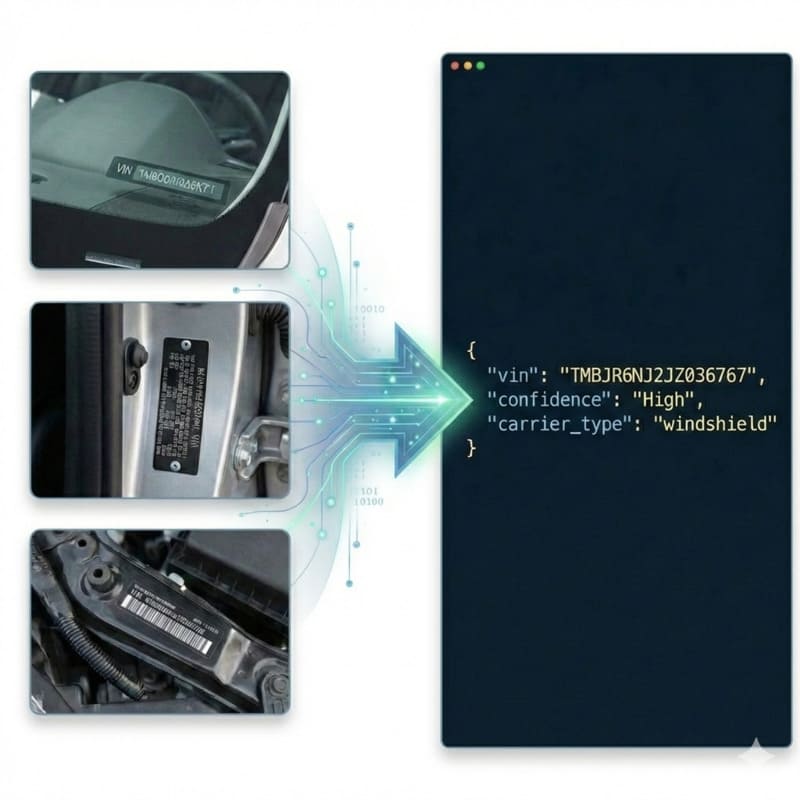
The Noise of Inventory and Auction Tags
Scanning vehicle information directly from an auction lot sticker or dealership inventory tag presents a unique 'needle in a haystack' problem. These thermal-printed stickers are highly crowded, featuring massive lot/run numbers, 1D/2D barcodes, vehicle trims, and buyer details. Standard OCR engines simply read all the text top-to-bottom, frequently misidentifying a 6-digit lot number or a parts sequence as the vehicle identifier. Additionally, because these stickers are placed behind or on windshields, they suffer from glass glare and thermal print fading. For a deeper dive into how we isolate specific data structures, see the VIN OCR API.
StructOCR: Built for Precision and ISO Compliance
StructOCR doesn't just blindly read text; it searches for structural automotive intent. Powered by our flagship Automotive VIN OCR engine, it recognizes barcode-bearing auction stickers and locates the human-readable VIN printed beside or below the barcode while filtering out massive lot numbers and vehicle descriptions. It pinpoints the exact 17-character sequence and applies strict ISO 3779 format rules. The system also normalizes faded thermal print and strips non-alphanumeric noise.
Live Demo: VIN Barcode Scanner
No registration required. Upload a file to test the extraction.
Drop files here or click to browse
JPG · PNG · PDF · TIFF · up to 500 files · max 4.5 MB each
Photograph the VIN plate at the bottom of the windshield or the label on the driver-side door jamb.
No document handy?
Core Industry Applications
Auto Auction Yard Check-In/Out
Accelerate gate operations. Drivers can simply snap a photo of the windshield sticker to instantly log vehicles entering or leaving the wholesale auction yard. Get 200 free credits to test your own yard tags.To streamline your vehicle intake process without any integration, try capturing data effortlessly with our free VIN barcode scanner directly from your browser.
Dealership Floorplan Audits
Streamline inventory financing (floorplan) audits. Inspectors can walk the lot and scan dealer stickers to instantly reconcile physical inventory against bank records.
Wholesale Vehicle Transport
Automate the creation of Electronic Bills of Lading (eBOL). Truck drivers scan the auction tags to verify they are loading the exact vehicles assigned to their dispatch.
Used Car Reconditioning
Service technicians can scan the intake sticker to pull up work orders and order correct OEM parts without manually typing 17 characters.
Technical Specs
- Validation: Built-in ISO 3779 rules & Length constraint (strictly 17 chars)
- Auto-Correction: Resolves I/1, O/0, Q/0 ambiguities automatically
- Latency: < 1.2s per document
- Data Privacy: Images kept for at most 24 hours for quality spot-checks, then deleted (SOC 2 Type II)
Key Features
- Clutter Rejection: Automatically ignores massive lot numbers, run numbers, and vehicle model descriptions.
- Through-Glass Filtering: Mitigates the optical glare from windshields when stickers are placed internally.
- Format Support: Accepts raw Base64 or Data URIs (JPG, PNG, WebP up to 4.5MB).
Integration & AI Prompts
Call the endpoint directly, or copy the prompt below into Cursor, Lovable, or v0 to instantly generate your frontend application.
import requests
import base64

# Get 200 free credits:
# 👉 https://structocr.com/register

# 1. Prepare Base64 Image
with open("auction_sticker.jpg", "rb") as image_file:
    base64_image = base64.b64encode(image_file.read()).decode('utf-8')

url = "https://api.structocr.com/v1/vin"
headers = {
    "x-api-key": "YOUR_API_KEY",
    "Content-Type": "application/json"
}
payload = {
    "img": base64_image
}

try:
    print("Scanning Auction Sticker...")
    response = requests.post(url, headers=headers, json=payload)
    result = response.json()

    if result.get('success'):
        data = result['data']
        print("✅ Extraction Successful!")
        print(f"VIN:          {data.get('vin')}")
        print(f"Confidence:   {data.get('confidence')}")
        print(f"Carrier Type: {data.get('carrier_type')}")
    else:
        print(f"❌ Extraction Failed: {result.get('error')} - {result.get('message')}")

except Exception as e:
    print(f"An error occurred: {e}")
Standardized JSON Output
The API returns a clean, structured payload containing the validated 17-character VIN, structural confidence, and identifies the carrier as a document (sticker).
{
  "success": true,
  "data": {
    "vin": "1G1RC6E45BU123456",
    "confidence": "High",
    "carrier_type": "document"
  }
}
Frequently Asked Questions
Does the system get confused by the massive lot numbers or barcodes on the sticker?
No. Our engine utilizes strict structural searching based on ISO 3779 constraints. It actively skips over 6-digit run numbers, dates, and vehicle descriptions to isolate the exact 17-character VIN sequence.
What happens if the thermal print on the auction sticker has faded?
StructOCR applies deep learning contrast normalization prior to extraction. As long as faint pixel remnants of the characters exist, the system can often reconstruct them, using the built-in VIN checksum to verify the result.
What image formats and sizes are supported?
The API accepts JPG, PNG, and WebP formats. Images can be sent as direct URLs or Base64 encoded strings, with a maximum payload size of 4.5MB.
Explore More Automotive VIN OCR Solutions
Universal VIN OCR API Solution
Our flagship API for automated vehicle identification. Works across windshields, documents, and physical plates, with check-digit validation.
Auto Insurance Policy VIN OCR API
Extract 17-character VINs from highly variable auto insurance policies and ID cards. Template-free OCR that handles unstructured layouts and scanned faxes.
Auto Repair Invoice VIN OCR API
Extract 17-character VINs from auto repair orders and shop invoices. High-accuracy OCR that handles thermal paper, grease stains, and unstructured layouts.
Auto Transport BoL VIN OCR API
Extract multiple 17-character VINs simultaneously from vehicle transport Bills of Lading (BoL). High-accuracy OCR that parses dense logistics tables.
Cyrillic Vehicle Registration OCR API
Extract 17-character VINs from Cyrillic vehicle documents (like Russian STS). Advanced OCR eliminates visual homoglyph confusion between Cyrillic and Latin alphabets.
Digital Screen VIN OCR API
Extract 17-character VINs from photos of computer screens and digital monitors. High-accuracy OCR that eliminates Moiré patterns, pixelation, and screen glare.
Door Jamb Certification Label VIN OCR API
Extract 17-character VINs from barcode-bearing door jamb certification labels. High-accuracy OCR handles tire pressure, weight specs, grime, and dense vehicle data.
Door Jamb Compliance Label VIN OCR API
Extract 17-character VINs from door jamb safety certification labels. High-accuracy OCR that handles sideways images, complex compliance boilerplate, and varied lighting conditions.
Door Jamb Metal Plate VIN OCR API
Extract 17-character VINs and Frame Numbers from stamped metal door jamb plates. High-accuracy OCR that handles sideways images, metal glare, and low-contrast text.
GCC Compliance Plate VIN OCR API
Extract 17-character VINs from stamped GCC/Saudi vehicle compliance metal plates. High-accuracy OCR that handles painted metal glare, rivets, and Arabic boilerplate.
German Vehicle Registration OCR API
Extract 17-character VINs from German Zulassungsbescheinigung Teil I documents. Bypass holographic security and decode dense Field 'E' abbreviations effortlessly.
Technical Comparisons & Integrations
Explore platform integrations and competitive analysis
OpenALPR vs. StructOCR API for VIN Decoding
Why traditional License Plate Recognition (ALPR) engines are not suitable for scanning Vehicle Identification Numbers (VINs).
Add VIN OCR to Your Replit App in 5 Minutes
Step-by-step guide to integrating the StructOCR VIN scanner API into a Replit application. Build automotive and fleet tools using Replit Agent and Secrets.
Add VIN OCR to Your v0 App in 5 Minutes
Step-by-step guide to integrating the StructOCR VIN scanner API into a v0 by Vercel app. Build automotive and fleet tools with zero backend.
VIN Barcode Scanner vs. VIN OCR API: Which is Better for Mobile Apps?
Deciding between local VIN barcode scanners and cloud-based VIN OCR API for your mobile app? Learn why OCR is the required fallback for damaged or chassis-stamped VINs.
Apple Vision Framework / ML Kit vs. StructOCR VIN API
Why generic on-device text recognition frameworks fail at decoding VINs, and when to switch to a specialized automotive API.
Add VIN OCR to Your Bolt.new App in 5 Minutes
Step-by-step guide to integrating the StructOCR VIN scanner API into a Bolt.new app. Build automotive and fleet tools right in your browser.
From tutorial to production in 5 minutes.
You've seen the code. Now get your API key, grab your 200 free credits, and see it work with your own images. No credit card required.