Door Jamb Compliance Label VIN OCR
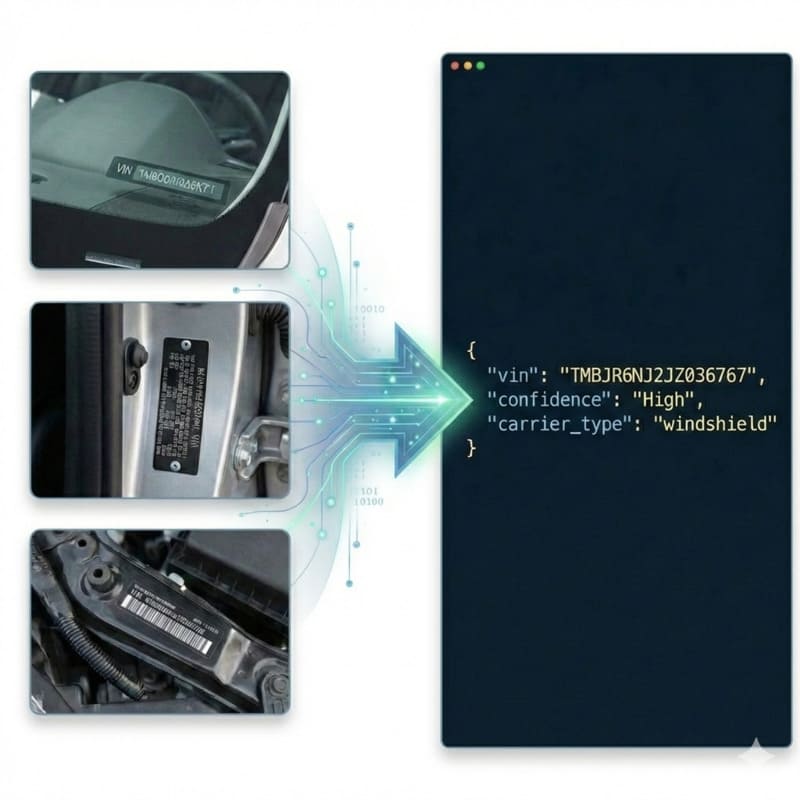
Automate vehicle verification at the source. Accurately extract and validate the 17-character VIN from door jamb safety certification labels, overcoming sideways orientations and dense boilerplate text.
200 free credits = 200 VIN scans, no credit card. Then from $5 for 500 credits, pay as you go. See pricing
The Challenge of Door Jamb Safety Labels
The B-pillar or door jamb safety certification label is a primary data source for automotive inspections. However, scanning these labels in the field is difficult: they are often oriented vertically depending on the door hinge, forcing the OCR engine to handle arbitrary text rotation. Furthermore, these labels are packed with secondary technical data—such as GVWR weight specifications and federal safety standards—which act as massive visual distractors. Traditional OCR engines struggle to ignore this 'boilerplate' text to focus solely on the 17-character VIN. For a deeper dive into how we isolate specific data structures, see the VIN OCR API.
StructOCR: Built for Rotated and Dense Labels
StructOCR automatically detects and normalizes text orientation, meaning the API works perfectly even if the inspector takes a sideways or upside-down photo. Powered by our flagship Automotive VIN OCR engine, it scans the entire label, explicitly filtering out weight specifications, safety compliance text, and barcode patterns. It locks onto the VIN using strict ISO 3779 validation, so the output is validated and ready for database entry.
Live Demo: VIN Barcode Scanner
No registration required. Upload a file to test the extraction.
Drop files here or click to browse
JPG · PNG · PDF · TIFF · up to 500 files · max 4.5 MB each
Photograph the VIN plate at the bottom of the windshield or the label on the driver-side door jamb.
No document handy?
Core Industry Applications
Dealership Inventory Reconciliation
Streamline lot audits. Technicians can walk the lot, opening doors to quickly scan jamb labels and ensure the physical vehicle matches the digital inventory records. Get 200 free credits to test your own labels.To streamline your vehicle intake process without any integration, try capturing data effortlessly with our free VIN barcode scanner directly from your browser.
Collision Repair Shop Intake
Ensure the correct vehicle is being serviced. Scanning the jamb label instantly retrieves the exact VIN required for ordering manufacturer-specific replacement parts.
Automotive Insurance Underwriting
Agents verify the exact vehicle configuration (including built-in factory specs on the same label) to accurately price premiums during the underwriting process.
Vehicle Registration & Titling
Automate state or provincial registration renewals by allowing the customer to upload a clear scan of their door jamb sticker instead of manually typing the VIN.
Technical Specs
- Orientation Handling: Automatically detects and processes text rotated at any angle (0°-360°)
- Validation: Built-in ISO 3779 rules & Length constraint (strictly 17 chars)
- Latency: < 1.2s per scan
- Data Privacy: Images kept for at most 24 hours for quality spot-checks, then deleted (SOC 2 Type II)
Key Features
- Boilerplate Filtering: Specifically trained to skip over weight/safety specs, manufacturing dates, and standard compliance statements.
- Robust Bounding: Detects the VIN sequence even when crowded by other alpha-numeric text blocks on the same sticker.
- Format Support: Accepts raw Base64 or Data URIs (JPG, PNG, WebP up to 4.5MB).
Integration & AI Prompts
Call the endpoint directly, or copy the prompt below into Cursor, Lovable, or v0 to instantly generate your frontend application.
import requests
import base64

# Get 200 free credits:
# 👉 https://structocr.com/register

# 1. Prepare Base64 Image
with open("door_jamb_label.jpg", "rb") as image_file:
    base64_image = base64.b64encode(image_file.read()).decode('utf-8')

url = "https://api.structocr.com/v1/vin"
headers = {
    "x-api-key": "YOUR_API_KEY",
    "Content-Type": "application/json"
}
payload = {
    "img": base64_image
}

try:
    print("Scanning Door Jamb Compliance Label...")
    response = requests.post(url, headers=headers, json=payload)
    result = response.json()

    if result.get('success'):
        data = result['data']
        print("✅ Extraction Successful!")
        print(f"VIN:          {data.get('vin')}")
        print(f"Confidence:   {data.get('confidence')}")
        print(f"Carrier Type: {data.get('carrier_type')}")
    else:
        print(f"❌ Extraction Failed: {result.get('error')} - {result.get('message')}")

except Exception as e:
    print(f"An error occurred: {e}")
Standardized JSON Output
The API returns a clean, structured payload containing the validated 17-character VIN, structural confidence, and identifies the carrier as a document.
{
  "success": true,
  "data": {
    "vin": "2C3CDXBT6GH123456",
    "confidence": "High",
    "carrier_type": "document"
  }
}
Frequently Asked Questions
Do I need to take the photo perfectly straight? The label is sideways on my door frame.
No. Our engine features omnidirectional rotation correction. It will automatically detect text orientation and extract the VIN accurately, even if the photo is taken sideways or upside down.
Will the API get confused by all the weight numbers (GVWR) on the label?
No. Our visual grounding models are trained to ignore 'auxiliary numeric blocks' like weight labels or dates, focusing specifically on the structural composition of the 17-character alphanumeric VIN sequence.
What image formats and sizes are supported?
The API accepts JPG, PNG, and WebP formats. Images can be sent as direct URLs or Base64 encoded strings, with a maximum payload size of 4.5MB.
Explore More Automotive VIN OCR Solutions
Universal VIN OCR API Solution
Our flagship API for automated vehicle identification. Works across windshields, documents, and physical plates, with check-digit validation.
Door Jamb Metal Plate VIN OCR API
Extract 17-character VINs and Frame Numbers from stamped metal door jamb plates. High-accuracy OCR that handles sideways images, metal glare, and low-contrast text.
GCC Compliance Plate VIN OCR API
Extract 17-character VINs from stamped GCC/Saudi vehicle compliance metal plates. High-accuracy OCR that handles painted metal glare, rivets, and Arabic boilerplate.
German Vehicle Registration OCR API
Extract 17-character VINs from German Zulassungsbescheinigung Teil I documents. Bypass holographic security and decode dense Field 'E' abbreviations effortlessly.
Indian RC Book OCR API
Extract Chassis Numbers (VINs) from Indian RC Books and Smart Cards. High-accuracy OCR designed to overcome micro-text, Hindi/English bilingual adhesion, and card damage.
Indonesian STNK OCR API
Extract VINs (Nomor Rangka) from Indonesian STNK documents. Specialized OCR engine engineered to decode faded dot-matrix printing and complex backgrounds.
Logistics Window Label VIN OCR API
Extract 17-character VINs from tiny transport labels on tinted vehicle windows. High-accuracy OCR that conquers distance, dark glass reflections, and heavy barcodes.
Metal Plate VIN OCR API
Extract 17-character VINs directly from engraved or stamped metal vehicle data plates. High-accuracy OCR that conquers metal glare, low contrast, and physical wear.
Mexico Vehicle Registration OCR API
Extract 17-character VINs from highly fragmented Mexican Tarjeta de Circulación documents. Template-free Spanish OCR designed for cross-border fleet management.
Monroney Sticker VIN OCR API
Extract 17-character VINs from massive Monroney window stickers. High-accuracy OCR that navigates dense feature lists, pricing tables, and EPA data.
Motorcycle Frame VIN OCR API
Extract 17-character VINs from stamped motorcycle frames and steering headstocks. High-accuracy OCR that handles curved metal, cable occlusions, and rust.
Technical Comparisons & Integrations
Explore platform integrations and competitive analysis
Add VIN OCR to Your Bolt.new App in 5 Minutes
Step-by-step guide to integrating the StructOCR VIN scanner API into a Bolt.new app. Build automotive and fleet tools right in your browser.
Add VIN OCR using Cursor in 5 Minutes
Step-by-step guide to integrating the StructOCR VIN scanner API using the Cursor AI code editor. Build automotive and fleet tools rapidly.
Add VIN OCR to Your Lovable.dev App in 5 Minutes
Step-by-step guide to integrating the StructOCR VIN scanner API into a Lovable.dev app. Build automotive and fleet tools with zero backend required.
OpenALPR vs. StructOCR API for VIN Decoding
Why traditional License Plate Recognition (ALPR) engines are not suitable for scanning Vehicle Identification Numbers (VINs).
Add VIN OCR to Your Replit App in 5 Minutes
Step-by-step guide to integrating the StructOCR VIN scanner API into a Replit application. Build automotive and fleet tools using Replit Agent and Secrets.
Add VIN OCR to Your v0 App in 5 Minutes
Step-by-step guide to integrating the StructOCR VIN scanner API into a v0 by Vercel app. Build automotive and fleet tools with zero backend.
From tutorial to production in 5 minutes.
You've seen the code. Now get your API key, grab your 200 free credits, and see it work with your own images. No credit card required.