Metal Data Plate VIN OCR
Digitize physical vehicle inspections. Accurately extract the 17-character VIN from engraved or stamped metal chassis plates, overcoming severe metal glare and low-contrast lettering.
200 free credits = 200 VIN scans, no credit card. Then from $5 for 500 credits, pay as you go. See pricing
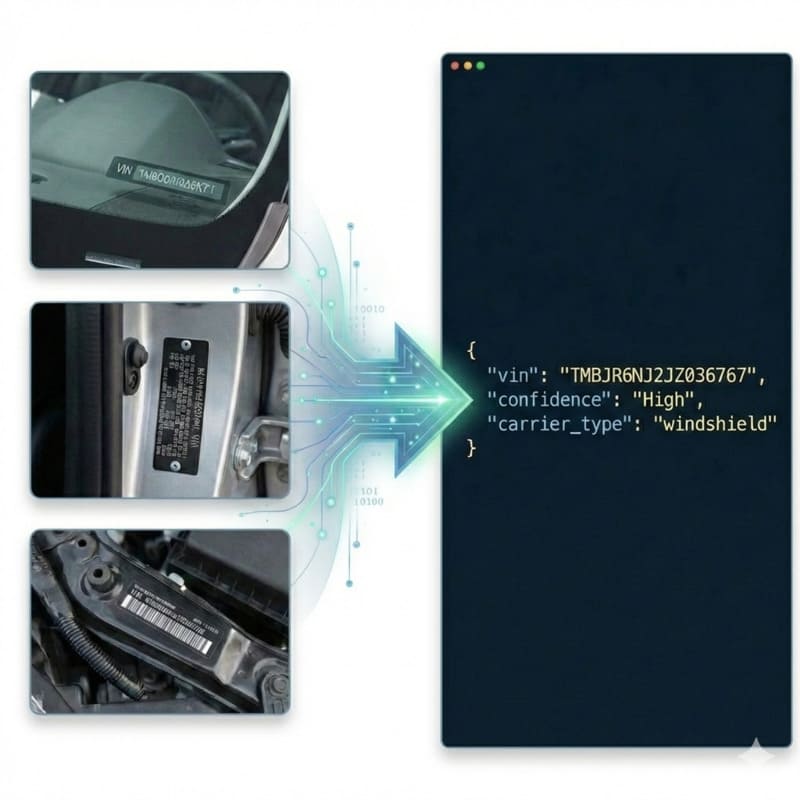
The Challenge of Engraved Metal Plates
Scanning a physical vehicle data plate (chassis plate) introduces severe computer vision obstacles. Unlike paper documents, metal plates rely on stamped or engraved characters which lack ink contrast. The visibility of the VIN depends entirely on the angle of the light creating shadows within the grooves. Combined with specular metal glare, physical scratches, dirt, and mechanical fasteners (rivets) near the text, traditional OCR engines fail entirely. For a deeper dive into how we handle physical textures, see the VIN OCR API.
StructOCR: Built for Physical Textures
StructOCR is specifically trained on 'in-the-wild' industrial textures. It leverages the micro-shadows of stamped letters to reconstruct the text, ignoring background metal reflections. Powered by our flagship Automotive VIN OCR engine, it accurately separates the 17-character alphanumeric VIN from surrounding bilingual labels (such as Arabic manufacturer details). The system then applies strict ISO 3779 validation, auto-correcting characters that have been obscured by scratches (e.g., distinguishing an '8' from a 'B' on damaged metal).
Live Demo: VIN Barcode Scanner
No registration required. Upload a file to test the extraction.
Drop files here or click to browse
JPG · PNG · PDF · TIFF · up to 500 files · max 4.5 MB each
Photograph the VIN plate at the bottom of the windshield or the label on the driver-side door jamb.
No document handy?
Core Industry Applications
Customs & Border Inspections
Verify vehicle import/export compliance instantly by scanning the physical metal plate on the door jamb or engine bay and cross-referencing it with shipping manifests. Get 200 free credits to test your own captures.To streamline your vehicle intake process without any integration, try capturing data effortlessly with our free VIN barcode scanner directly from your browser.
Automotive Manufacturing QA
Automate assembly line verification by capturing and logging the stamped chassis plates before vehicles leave the factory.
Salvage & Scrap Yard Inventory
Quickly log total-loss or scrapped vehicles into inventory systems directly from the physical chassis plate when paperwork is missing.
Used Car Trade-In Appraisals
Ensure the physical vehicle matches the registration history. Dealerships can scan the metal plate to instantly pull accurate vehicle history reports.
Technical Specs
- Texture Processing: Optimized for stamped, engraved, and low-contrast characters
- Validation: Built-in ISO 3779 rules & Length constraint (strictly 17 chars)
- Latency: < 1.2s per scan
- Data Privacy: Images kept for at most 24 hours for quality spot-checks, then deleted (SOC 2 Type II)
Key Features
- Specular Glare Filtering: Normalizes uneven lighting and harsh reflections on metallic surfaces.
- Carrier Detection: Automatically identifies if the source is a document, windshield, or metal plate.
- Format Support: Accepts raw Base64 or Data URIs (JPG, PNG, WebP up to 4.5MB).
Integration & AI Prompts
Call the endpoint directly, or copy the prompt below into Cursor, Lovable, or v0 to instantly generate your frontend application.
import requests
import base64

# Get 200 free credits:
# 👉 https://structocr.com/register

# 1. Prepare Base64 Image
with open("metal_plate.jpg", "rb") as image_file:
    base64_image = base64.b64encode(image_file.read()).decode('utf-8')

url = "https://api.structocr.com/v1/vin"
headers = {
    "x-api-key": "YOUR_API_KEY",
    "Content-Type": "application/json"
}
payload = {
    "img": base64_image
}

try:
    print("Scanning Metal Data Plate...")
    response = requests.post(url, headers=headers, json=payload)
    result = response.json()

    if result.get('success'):
        data = result['data']
        print("✅ Extraction Successful!")
        print(f"VIN:          {data.get('vin')}")
        print(f"Confidence:   {data.get('confidence')}")
        print(f"Carrier Type: {data.get('carrier_type')}")
    else:
        print(f"❌ Extraction Failed: {result.get('error')} - {result.get('message')}")

except Exception as e:
    print(f"An error occurred: {e}")
Standardized JSON Output
The API returns a clean, structured payload containing the validated 17-character VIN, structural confidence, and correctly identifies the carrier as a metal plate.
{
  "success": true,
  "data": {
    "vin": "MA3EWX210R2123456",
    "confidence": "High",
    "carrier_type": "metal_plate"
  }
}
Frequently Asked Questions
What happens if the metal plate is scratched across the VIN?
Our engine relies on structural context and ISO 3779 validation. If a deep scratch distorts a single character (e.g., making an '8' look like a '3'), the API utilizes the built-in checksum logic to automatically recover and correct the intended character.
Do rivets or screws near the text cause recognition errors?
No. The pre-processing pipeline employs Smart Cropping and contour detection to isolate text blocks, explicitly ignoring circular mechanical fasteners like rivets or screws that often interfere with generic OCRs.
What image formats and sizes are supported?
The API accepts JPG, PNG, and WebP formats. Images can be sent as direct URLs or Base64 encoded strings, with a maximum payload size of 4.5MB.
Explore More Automotive VIN OCR Solutions
Universal VIN OCR API Solution
Our flagship API for automated vehicle identification. Works across windshields, documents, and physical plates, with check-digit validation.
Mexico Vehicle Registration OCR API
Extract 17-character VINs from highly fragmented Mexican Tarjeta de Circulación documents. Template-free Spanish OCR designed for cross-border fleet management.
Monroney Sticker VIN OCR API
Extract 17-character VINs from massive Monroney window stickers. High-accuracy OCR that navigates dense feature lists, pricing tables, and EPA data.
Motorcycle Frame VIN OCR API
Extract 17-character VINs from stamped motorcycle frames and steering headstocks. High-accuracy OCR that handles curved metal, cable occlusions, and rust.
Police Accident Report VIN OCR API
Extract 17-character VINs from scanned police crash reports. High-accuracy OCR that bypasses dense checkboxes, diagrams, and fax degradation.
Japanese Export Certificate & Shaken OCR API
Extract JDM Chassis Numbers (車台番号) and standard VINs from Japanese Shaken and Export Certificates. Overcome dense Kanji and non-standard JDM formats with high-accuracy OCR.
Thai Vehicle Registration OCR API
Extract 17-character VINs from Thai vehicle registration books (Lem Tabian). Advanced OCR designed to overcome Thai language boundary truncation and diacritic noise.
Trailer Chassis Plate VIN OCR API
Extract 17-character VINs from extremely dirty, rusted, or painted trailer chassis data plates. High-accuracy OCR built for heavy-duty fleet operations.
UAE Vehicle Registration VIN OCR API
Extract 17-character VINs (Chassis Numbers) from UAE Mulkiya registration cards. High-accuracy OCR that bypasses heavy watermarks and bilingual tabular layouts.
US DMV Title VIN OCR API
Extract 17-character VINs from US DMV Titles across all 50 states. High-accuracy OCR that bypasses security paper backgrounds and dot-matrix print.
UK V5C Logbook VIN OCR API
Extract 17-character VINs from UK DVLA V5C registration certificates. High-accuracy API that parses logbook layouts and ignores complex security backgrounds.
Technical Comparisons & Integrations
Explore platform integrations and competitive analysis
OpenALPR vs. StructOCR API for VIN Decoding
Why traditional License Plate Recognition (ALPR) engines are not suitable for scanning Vehicle Identification Numbers (VINs).
Add VIN OCR to Your Replit App in 5 Minutes
Step-by-step guide to integrating the StructOCR VIN scanner API into a Replit application. Build automotive and fleet tools using Replit Agent and Secrets.
Add VIN OCR to Your v0 App in 5 Minutes
Step-by-step guide to integrating the StructOCR VIN scanner API into a v0 by Vercel app. Build automotive and fleet tools with zero backend.
VIN Barcode Scanner vs. VIN OCR API: Which is Better for Mobile Apps?
Deciding between local VIN barcode scanners and cloud-based VIN OCR API for your mobile app? Learn why OCR is the required fallback for damaged or chassis-stamped VINs.
Apple Vision Framework / ML Kit vs. StructOCR VIN API
Why generic on-device text recognition frameworks fail at decoding VINs, and when to switch to a specialized automotive API.
Add VIN OCR to Your Bolt.new App in 5 Minutes
Step-by-step guide to integrating the StructOCR VIN scanner API into a Bolt.new app. Build automotive and fleet tools right in your browser.
From tutorial to production in 5 minutes.
You've seen the code. Now get your API key, grab your 200 free credits, and see it work with your own images. No credit card required.