Auto Insurance Policy VIN Extraction
Automate claims and underwriting workflows. Accurately extract the 17-character VIN from completely unstructured insurance policies, ACORD forms, and digital ID cards—without needing templates.
200 free credits = 200 VIN scans, no credit card. Then from $5 for 500 credits, pay as you go. See pricing
The Chaos of Unstructured Insurance Layouts
Automating data extraction from auto insurance documents is notoriously difficult due to the lack of standardization. Every carrier—from local brokers to global providers—uses a different layout for their Proof of Insurance cards, declarations pages, and ACORD forms. Standard OCR relies on rigid templates (Zonal OCR) to find data, which instantly breaks when a new insurance carrier is introduced or if the document is a low-quality fax/scan. The target data might be labeled as 'VIN', 'Vehicle ID', 'Chassis', or have no label at all. For a deeper dive into how our API handles unstructured data, see the VIN OCR API.
StructOCR: Template-Free Semantic Extraction
StructOCR eliminates the need to build and maintain thousands of carrier templates. Powered by our flagship Automotive VIN OCR API, it scans the entire document to semantically identify the automotive structure. It intelligently sifts through policy numbers, driver details, and legal boilerplate. By leveraging strict ISO 3779 validation, the engine instantly locks onto the 17-character sequence regardless of where it appears on the page, digitizing the asset perfectly on the first try.
Live Demo: VIN Barcode Scanner
No registration required. Upload a file to test the extraction.
Drop files here or click to browse
JPG · PNG · PDF · TIFF · up to 500 files · max 4.5 MB each
Photograph the VIN plate at the bottom of the windshield or the label on the driver-side door jamb.
No document handy?
Core Industry Applications
Automated Claims First Notice of Loss (FNOL)
Accelerate claims processing by allowing policyholders to upload their insurance card or policy page, instantly pulling the valid VIN into the claims management system. Get 200 free credits to test your own documents.To streamline your vehicle intake process without any integration, try capturing data effortlessly with our free VIN barcode scanner directly from your browser.
Auto Lending & Finance Verification
Lenders can automate the 'Proof of Insurance' verification step during loan origination by instantly parsing the submitted PDF or image for the matching collateral VIN.
Fleet Management Compliance
Automatically audit and index thousands of bulk insurance documents for commercial fleets, ensuring every registered VIN has active, matching coverage on file.
DMV & Registration Portals
State and provincial authorities can automate the verification of mandatory insurance requirements during online vehicle registration renewals.
Technical Specs
- Template-Free Architecture: Dynamically locates data across 10,000+ varying insurance carrier layouts
- Validation: Built-in ISO 3779 rules & Length constraint (strictly 17 chars)
- Latency: < 1.2s per document via API
- Data Privacy: Images kept for at most 24 hours for quality spot-checks, then deleted (SOC 2 Type II)
Key Features
- Unstructured Parsing: Successfully identifies the VIN even if the label 'VIN' is missing or worded differently (e.g., 'Serial No.').
- Policy Number Bypass: Intelligently ignores long alphanumeric policy numbers that often confuse generic OCR.
- Format Support: Accepts raw Base64 or Data URIs (JPG, PNG, WebP up to 4.5MB).
Integration & AI Prompts
Call the API endpoint directly in your backend, or copy the prompt below into Cursor, Lovable, or v0 to instantly generate your frontend application.
import requests
import base64

# Get 200 free credits:
# 👉 https://structocr.com/register

# 1. Prepare Base64 Image
with open("insurance_policy.jpg", "rb") as image_file:
    base64_image = base64.b64encode(image_file.read()).decode('utf-8')

url = "https://api.structocr.com/v1/vin"
headers = {
    "x-api-key": "YOUR_API_KEY",
    "Content-Type": "application/json"
}
payload = {
    "img": base64_image
}

try:
    print("Scanning Insurance Document...")
    response = requests.post(url, headers=headers, json=payload)
    result = response.json()

    if result.get('success'):
        data = result['data']
        print("✅ Extraction Successful!")
        print(f"VIN:          {data.get('vin')}")
        print(f"Confidence:   {data.get('confidence')}")
        print(f"Carrier Type: {data.get('carrier_type')}")
    else:
        print(f"❌ Extraction Failed: {result.get('error')} - {result.get('message')}")

except Exception as e:
    print(f"An error occurred: {e}")
Standardized JSON Output
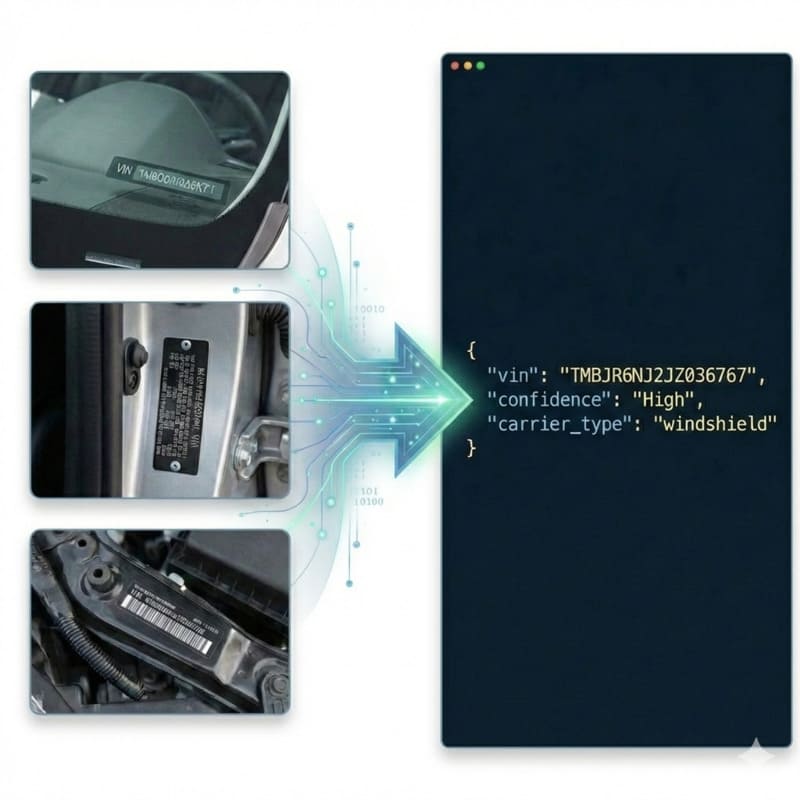
The API returns a clean, structured payload containing the validated 17-character VIN, structural confidence, and identifies the carrier as a document.
{
  "success": true,
  "data": {
    "vin": "1G1FX6S05H4123456",
    "confidence": "High",
    "carrier_type": "document"
  }
}
Frequently Asked Questions
Do I need to create a new template for every insurance carrier?
No. StructOCR operates entirely without templates. It uses semantic understanding and strict ISO 3779 structural rules to locate the VIN, meaning it works out-of-the-box for any insurance company's layout.
What happens if the insurance policy is a low-quality fax or scan?
Our deep learning pre-processing is optimized for legacy document artifacts. It cleans up the digital 'noise' typical of scanned faxes and uses checksum logic to correct any degraded characters.
Will the API confuse the policy number with the VIN?
No. Policy numbers lack the specific 17-character checksum logic dictated by the ISO standard. Our engine effortlessly bypasses policy numbers, agency codes, and phone numbers to extract the true vehicle identifier.
Explore More Automotive VIN OCR Solutions
Universal VIN OCR API Solution
Our flagship API for automated vehicle identification. Works across windshields, documents, and physical plates, with check-digit validation.
Auto Repair Invoice VIN OCR API
Extract 17-character VINs from auto repair orders and shop invoices. High-accuracy OCR that handles thermal paper, grease stains, and unstructured layouts.
Auto Transport BoL VIN OCR API
Extract multiple 17-character VINs simultaneously from vehicle transport Bills of Lading (BoL). High-accuracy OCR that parses dense logistics tables.
Cyrillic Vehicle Registration OCR API
Extract 17-character VINs from Cyrillic vehicle documents (like Russian STS). Advanced OCR eliminates visual homoglyph confusion between Cyrillic and Latin alphabets.
Digital Screen VIN OCR API
Extract 17-character VINs from photos of computer screens and digital monitors. High-accuracy OCR that eliminates Moiré patterns, pixelation, and screen glare.
Door Jamb Certification Label VIN OCR API
Extract 17-character VINs from barcode-bearing door jamb certification labels. High-accuracy OCR handles tire pressure, weight specs, grime, and dense vehicle data.
Door Jamb Compliance Label VIN OCR API
Extract 17-character VINs from door jamb safety certification labels. High-accuracy OCR that handles sideways images, complex compliance boilerplate, and varied lighting conditions.
Door Jamb Metal Plate VIN OCR API
Extract 17-character VINs and Frame Numbers from stamped metal door jamb plates. High-accuracy OCR that handles sideways images, metal glare, and low-contrast text.
GCC Compliance Plate VIN OCR API
Extract 17-character VINs from stamped GCC/Saudi vehicle compliance metal plates. High-accuracy OCR that handles painted metal glare, rivets, and Arabic boilerplate.
German Vehicle Registration OCR API
Extract 17-character VINs from German Zulassungsbescheinigung Teil I documents. Bypass holographic security and decode dense Field 'E' abbreviations effortlessly.
Indian RC Book OCR API
Extract Chassis Numbers (VINs) from Indian RC Books and Smart Cards. High-accuracy OCR designed to overcome micro-text, Hindi/English bilingual adhesion, and card damage.
Technical Comparisons & Integrations
Explore platform integrations and competitive analysis
Add VIN OCR using Cursor in 5 Minutes
Step-by-step guide to integrating the StructOCR VIN scanner API using the Cursor AI code editor. Build automotive and fleet tools rapidly.
Add VIN OCR to Your Lovable.dev App in 5 Minutes
Step-by-step guide to integrating the StructOCR VIN scanner API into a Lovable.dev app. Build automotive and fleet tools with zero backend required.
OpenALPR vs. StructOCR API for VIN Decoding
Why traditional License Plate Recognition (ALPR) engines are not suitable for scanning Vehicle Identification Numbers (VINs).
Add VIN OCR to Your Replit App in 5 Minutes
Step-by-step guide to integrating the StructOCR VIN scanner API into a Replit application. Build automotive and fleet tools using Replit Agent and Secrets.
Add VIN OCR to Your v0 App in 5 Minutes
Step-by-step guide to integrating the StructOCR VIN scanner API into a v0 by Vercel app. Build automotive and fleet tools with zero backend.
VIN Barcode Scanner vs. VIN OCR API: Which is Better for Mobile Apps?
Deciding between local VIN barcode scanners and cloud-based VIN OCR API for your mobile app? Learn why OCR is the required fallback for damaged or chassis-stamped VINs.
From tutorial to production in 5 minutes.
You've seen the code. Now get your API key, grab your 200 free credits, and see it work with your own images. No credit card required.