Raspberry Pi ALPR: Heavy Docker Images vs. Lightweight API Calls
Stop maxing out your Raspberry Pi's CPU with resource-heavy OpenALPR Docker containers. Offload license plate recognition to a lightning-fast cloud API using a simple script.
200 free credits = 200 License Plate scans, no credit card. Then from $5 for 500 credits, pay as you go. See pricing
The Thermal Reality of Running ALPR on the Edge
For makers and IoT developers, building an alpr raspberry pi system is an exciting project, but it often hits a wall in deployment. Attempting to run a full alpr docker container locally quickly exposes the hardware's limitations. Openalpr docker images and similar open-source models demand significant memory and compute power. This leads to thermal throttling, high power consumption, and frustratingly slow frame processing times—often taking seconds just to parse a single image. Before you buy expensive cooling fans or upgrade to a heavier edge server, test your real-world camera captures against our API for free to experience millisecond resolution.
The Edge-to-Cloud Optimization Strategy
The smartest architecture for resource-constrained devices is offloading. Instead of forcing the Raspberry Pi to perform complex matrix math, restrict its job to what it does best: triggering the camera, grabbing a frame, and uploading it. By sending the image to the StructOCR License Plate API, the heavy lifting is handled by powerful GPU clusters routed through Cloudflare's edge network. You get instant, highly accurate results without the hardware strain.
Live Demo: License Plate OCR Scanner
No registration required. Upload a file to test the extraction.
Drop files here or click to browse
JPG · PNG · PDF · TIFF · up to 500 files · max 4.5 MB each
No document handy?
Ideal Scenarios for API-Driven Raspberry Pi ALPR
Smart Home Gate Automation
Build a responsive driveway gate that opens instantly. A lightweight Python script on the Pi can snap a photo, call the API, and trigger a relay in under a second.
Solar-Powered Remote Cameras
Running heavy Docker models drains batteries fast. API calls require minimal CPU cycles, dramatically extending the uptime of off-grid solar ALPR setups.
Scaling from DIY to Production
Ready to turn your prototype into a commercial product? Skip managing a fleet of fragile Docker instances and rely on a scalable REST architecture. View flexible pricing tailored for growing SaaS platforms.
Multi-Camera Hubs
Use a single Raspberry Pi to manage multiple cheap RTSP cameras. The Pi acts solely as a router, forwarding frames to the cloud rather than choking on parallel video processing.
Technical Specs
- Zero Thermal Throttling: Keep your Raspberry Pi cool and extend the lifespan of your SD card by avoiding heavy local data processing and swap-file usage.
- Minimal Bandwidth: Sending a highly compressed Base64 string requires kilobytes of data, making it feasible even on 4G/LTE cellular modems.
- Instant Updates: You never need to SSH into your devices to update an ALPR Docker container when recognition models improve. We handle the engine upgrades server-side.
- Universal Compatibility: Whether you use a Raspberry Pi Zero, 4, or 5, the API integration remains identical and dependency-free.
Key Features
- Native Script Recognition: Local models often struggle with non-Latin characters. Our cloud API seamlessly parses Arabic, Thai, Cyrillic, and more.
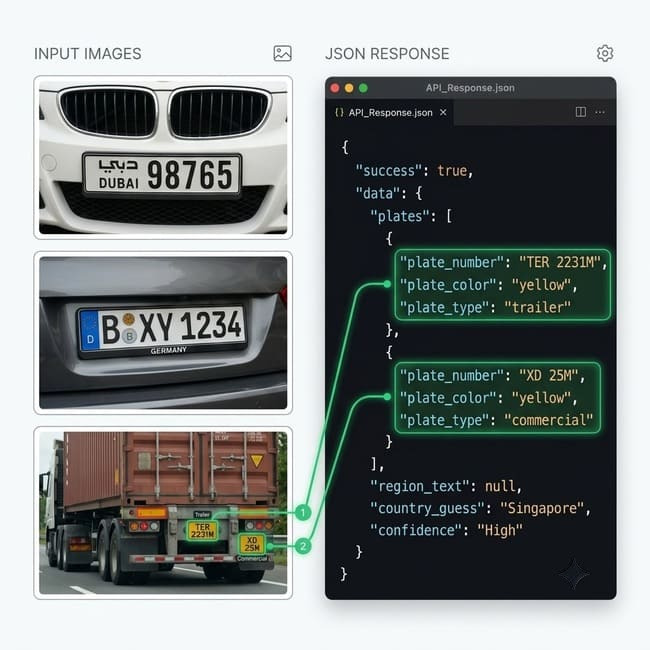
- Multi-Dimensional Output: Gain structured insights instantly. The API returns not just the text, but the vehicle type and plate color, organized neatly in JSON.
- Global Edge Routing: Deployed on Cloudflare, your Pi's request is routed to the nearest geographical data center, ensuring API responses feel as fast as local processing.
Raspberry Pi Integration: A Simple Python Script
Forget pulling massive images via `docker pull`. Use this lightweight script. The engine natively supports flexible inputs: you can pass raw Base64-encoded strings straight from memory to avoid excessive SD card writes. Check the API documentation for full payload parameters.
import requests
import base64
import time

# Simulating a captured frame from the Pi Camera
# In production, this could be a direct buffer stream
def capture_and_recognize(image_path):
    try:
        print("Reading image from SD card...")
        with open(image_path, "rb") as image_file:
            base64_image = base64.b64encode(image_file.read()).decode('utf-8')

        url = "https://api.structocr.com/v1/license-plate"
        headers = {
            "x-api-key": "YOUR_API_KEY",
            "Content-Type": "application/json"
        }
        payload = {
            "img": base64_image
        }

        print("Sending to StructOCR API...")
        start_time = time.time()
        response = requests.post(url, headers=headers, json=payload)
        result = response.json()

        print(f"API Latency: {time.time() - start_time:.2f} seconds")

        if result.get('success'):
            plates = result['data'].get('plates', [])
            if plates:
                plate = plates[0]
                print(f"✅ Plate Found: {plate.get('plate_number')} (Normalized: {plate.get('plate_number_normalized')}) | Color: {plate.get('plate_color')}")
                print(f"Country Guess: {result['data'].get('country_guess')} | Confidence: {result['data'].get('confidence_score')}")
                # Trigger GPIO pin for gate here
            else:
                print("No plates detected in frame.")
        else:
            print(f"❌ Error: {result.get('error') or result.get('message')}")

    except Exception as e:
        print(f"System error: {e}")

# Execute
capture_and_recognize("driveway_capture.jpg")
Actionable JSON Payloads
Receive structured, predictable data that is easy to parse with Python's native JSON library, completely bypassing the messy console outputs of command-line OCR tools.
{
  "success": true,
  "data": {
    "plates": [
      {
        "plate_number": "XYZ 789",
        "plate_number_normalized": "XYZ789",
        "plate_color": "white",
        "plate_type": "private"
      }
    ],
    "region_text": "California",
    "country_guess": "United States",
    "confidence_score": 0.99
  }
}
Frequently Asked Questions
Can I run OpenALPR Docker on a Raspberry Pi instead?
You can, but it is highly resource-intensive. Running complex computer vision models locally on ARM architecture often results in high latency, overheating, and SD card corruption over time. An API approach is vastly more stable.
What happens if my Pi loses internet connection?
Because this is a cloud-based API, an active internet connection is required. For remote deployments, we recommend a simple logic loop in your Python script to queue captured images locally and upload them once the connection is restored.
Can I use this ALPR API for international projects outside of the US and Europe?
Absolutely. The engine is globally optimized to process international plate formats out of the box without requiring manual regional configuration. It accurately captures complex multi-plate layouts and native scripts across Asia, the Middle East, and the Americas, ensuring reliable recognition in diverse logistics environments.
Explore More License-plate Solutions
Stationary vs Mobile ALPR Cameras: OCR Backend Guide
Comparing mobile ALPR cameras and stationary license plate readers? Discover how our hardware-agnostic OCR API powers any ALPR camera system with ease.
Thai License Plate OCR API: Extract Native Scripts
Struggling with an OpenALPR Thai setup? Our global OCR number plate recognition API perfectly extracts native Thai scripts, province names, and color codes.
Vietnam ALPR & Motorcycle Plate Recognition API
Need reliable Vietnam ALPR for high-density motorcycle traffic? Our OCR API instantly extracts two-line square plates, plate colors, and vehicle types despite severe glare.
Arabic License Plate OCR API: Extract Non-Latin Scripts
Struggling with an OpenALPR Arabic setup? Our global OCR number plate recognition API perfectly extracts native Middle Eastern scripts, dual-layouts, and numerals.
Adding ALPR to Blue Iris & ZoneMinder: 2026 API Guide (Free Test)
Upgrade your VMS with Blue Iris ALPR or ZoneMinder ALPR. Learn how to send camera ALPR motion frames to our Cloud API for instant, low-cost license plate recognition.
ALPR for Law Enforcement: Tech Overview & API Backend
Discover how license plate readers for law enforcement power patrol cars and checkpoints. Integrate our high-speed ALPR API into your security systems today.
Legacy ALPR vs Modern APIs: Genetec & 3M Alternatives
Comparing ALPR system costs? Ditch expensive hardware bundles from Genetec, 3M, and Leonardo Elsag. Discover our hardware-agnostic ALPR cloud API for modern SaaS.
OpenALPR Pricing Guide & Best API Alternative (2026)
Navigating OpenALPR pricing? Compare Rekor OpenALPR costs and discover our scalable, cost-effective cloud API alternative. Supports crypto and global payments.
Python License Plate Recognition: OpenCV vs API (Free Test)
Building an OpenCV number plate recognition system? Compare traditional Python models with our ALPR Cloud API. Upload your car plate images for a free OCR test.
Technical Comparisons & Integrations
Explore platform integrations and competitive analysis
Add HIN OCR to Your Replit App in 5 Minutes
Step-by-step guide to integrating the StructOCR HIN (Hull Identification Number) scanner API into a Replit application. Build marine and boat management tools using Replit Agent and Secrets.
Add Invoice OCR to Your Replit App in 5 Minutes
Step-by-step guide to integrating the StructOCR invoice API into a Replit application. Build accounts payable and expense tracking tools using Replit Agent and Secrets.
Add National ID OCR to Your Replit App in 5 Minutes
Step-by-step guide to integrating the StructOCR National ID scanner API into a Replit application. Build KYC and identity verification flows using Replit Agent and Secrets.
Add Passport OCR to Your Replit App in 5 Minutes
Step-by-step guide to integrating the StructOCR Passport scanner API into a Replit application. Build travel, hospitality, and global KYC flows using Replit Agent and Secrets.
Add Receipt OCR to Your Replit App in 5 Minutes
Step-by-step guide to integrating the StructOCR receipt API into a Replit application. Build expense tracking and receipt scanning tools using Replit Agent and Secrets.
Add VIN OCR to Your Replit App in 5 Minutes
Step-by-step guide to integrating the StructOCR VIN scanner API into a Replit application. Build automotive and fleet tools using Replit Agent and Secrets.
From tutorial to production in 5 minutes.
You've seen the code. Now get your API key, grab your 200 free credits, and see it work with your own images. No credit card required.