Truck Stop Reweigh Ticket OCR
Extract printed ticket, vehicle, material and weight fields for first weighing and reweigh reconciliation. Keep gross, tare, net and review checks in structured JSON.
200 free credits = 100 Weighbridge Ticket scans, no credit card. Then from $5 for 500 credits, pay as you go. See pricing
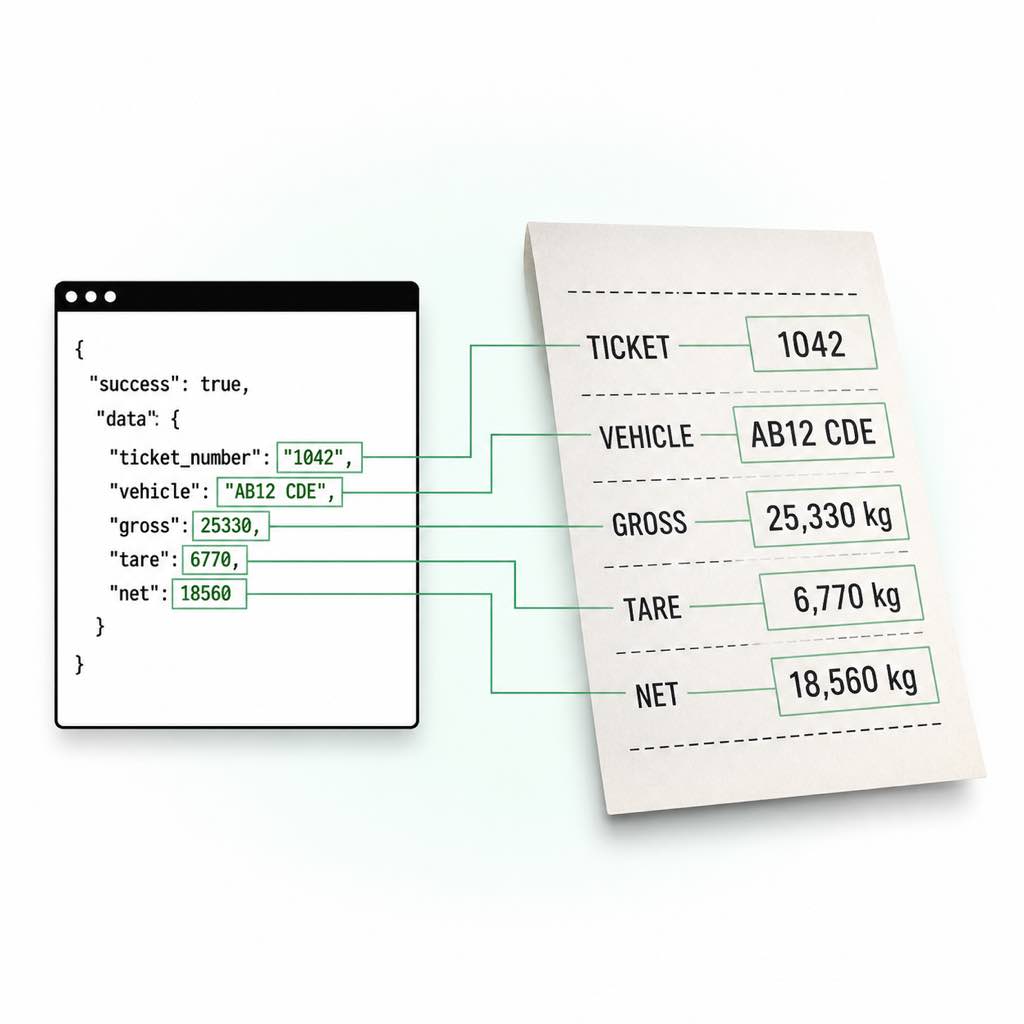
First weighing and reweigh reconciliation
Store each ticket as its own event and join reweighs in the application. A reweigh charge is not cargo value, and the newer event must not silently overwrite the original measurement. Operational teams often receive photos from drivers alongside orders, invoices and delivery messages. Start by identifying the actual weighing document and keeping it associated with the correct movement. A ticket number can repeat across facilities, and a familiar vehicle may carry several loads in one day. Neither field should be used alone as a global transaction key.
Keep measured evidence separate from business decisions
The weighbridge ticket endpoint returns facility, parties, job, vehicle, material, weights and timestamps when readable. Gross, tare and net retain their printed raw text, numeric value and unit, with normalized_kg for supported units. Deterministic validation is reported separately; calculated net is not a replacement for an absent printed net. Use gross, tare and net validation to inspect arithmetic, then apply the acceptance rules for your own transport or accounting workflow.
Live Demo: Weighbridge Ticket OCR Scanner
No registration required. Upload a file to test the extraction.
Drop files here or click to browse
JPG · PNG · PDF · TIFF · up to 500 files · max 4.5 MB each
No document handy?
Operational mapping
Document-specific review
Store each ticket as its own event and join reweighs in the application. A reweigh charge is not cargo value, and the newer event must not silently overwrite the original measurement.
Join the movement, not just the truck
Combine facility, ticket number, vehicle and available timestamps with a dispatch reference. Retain ambiguous matches in a queue instead of attaching a delivery to the first matching vehicle.
Separate units from amounts
Use normalized_kg for comparisons while retaining the printed unit and raw value. A number without an identifiable unit needs review; a fee or material code must not become a weight.
Keep extraction and settlement separate
Use printed net mass as one input to a downstream workflow. Price, grade, tax, customs clearance and operational acceptance require their own evidence and rules.
Technical Specs
- Endpoint: POST /v1/weighbridge-ticket
- Authentication: Server-side x-api-key header
- Input: Base64 image in JSON img; use a readable JPG, PNG or WebP for this example
- File size: Up to 4.5MB decoded
- Standard processing: 2 credits per scan
- Output: JSON; retain incomplete results for review
Key Features
- Scenario boundary: Store each ticket as its own event and join reweighs in the application. A reweigh charge is not cargo value, and the newer event must not silently overwrite the original measurement.
- Ticket identity: ticket_number and facility help identify the source; job and order references support operational joins.
- Vehicle: Keep truck, trailer, fleet and driver references in their respective fields.
- Printed weight: Retain raw, value and unit before using normalized_kg for comparison.
- Validation: Inspect needs_review and review_reasons; missing weights can be a valid feature of the document, not proof of a complete measurement set.
Extract and check a weighing ticket
Send one photographed ticket and inspect the validation object before importing it. The API checks supported weight arithmetic; it does not certify a scale or approve a shipment.
import base64
import os
import requests

with open("weight-ticket.jpg", "rb") as source:
    encoded = base64.b64encode(source.read()).decode("ascii")

response = requests.post(
    "https://api.structocr.com/v1/weighbridge-ticket",
    headers={"x-api-key": os.environ["STRUCTOCR_API_KEY"]},
    json={"img": encoded},
    timeout=60,
)
response.raise_for_status()
result = response.json()
if not result.get("success"):
    raise RuntimeError("Extraction was not successful; inspect the response securely")
data = result.get("data") or {}
validation = data.get("validation") or {}
needs_review = (
    not data.get("is_weighbridge_ticket")
    or not data.get("is_valid")
    or validation.get("needs_review", True)
)
print({"needs_review": needs_review, "reasons": validation.get("review_reasons", [])})
Synthetic weight-ticket response
An illustrative record, not a scan from an operator or customs authority. Printed gross minus tare matches the printed net in this example.
{
  "success": true,
  "data": {
    "is_weighbridge_ticket": true,
    "document_type": "generic_weighbridge_ticket",
    "ticket_number": "EXAMPLE-1042",
    "facility": {
      "name": "Example Scale Facility",
      "address": null,
      "scale_id": "SCALE-1"
    },
    "parties": {
      "supplier": null,
      "customer": null
    },
    "job": {
      "job_number": null,
      "order_number": null
    },
    "vehicle": {
      "registration": "EXAMPLE",
      "trailer_registration": null,
      "fleet_number": null,
      "driver_name": null
    },
    "material": {
      "description": "Example load",
      "code": null
    },
    "weights": {
      "gross": {
        "value": 25000,
        "unit": "kg",
        "raw": "25000 kg",
        "normalized_kg": 25000
      },
      "tare": {
        "value": 9000,
        "unit": "kg",
        "raw": "9000 kg",
        "normalized_kg": 9000
      },
      "net": {
        "value": 16000,
        "unit": "kg",
        "raw": "16000 kg",
        "normalized_kg": 16000
      }
    },
    "weigh_in_datetime": null,
    "weigh_out_datetime": null,
    "fee": {
      "amount": null,
      "currency": null
    },
    "operator_name": null,
    "notes": null,
    "confidence": "medium",
    "is_valid": true,
    "validation_error": null,
    "validation": {
      "calculated_net_kg": 16000,
      "difference_kg": 0,
      "weight_check_passed": true,
      "needs_review": false,
      "review_reasons": []
    }
  }
}
Frequently Asked Questions
What should I check for first weighing and reweigh reconciliation?
Store each ticket as its own event and join reweighs in the application. A reweigh charge is not cargo value, and the newer event must not silently overwrite the original measurement.
What if only gross weight is printed?
Keep tare and net missing. The validator can flag the incomplete weight set for review. Do not invent an empty-vehicle weight from another truck or copy a capacity rating into the ticket.
Does this certify a load or approve customs clearance?
No. It extracts printed evidence and checks supported weight arithmetic. Certification, legal limits, declarations and release decisions remain separate processes.
Can it extract axle groups or container identifiers into dedicated fields?
The current schema has gross, tare and net weight objects and truck/trailer registration fields. It has no dedicated axle-group array or container-number field. Use another extractor or a reviewed extension for those requirements.
How can I avoid counting the same load twice?
Keep each scan as an event and reconcile ticket number, facility, vehicle and time with your dispatch record. Reweighs, corrections and first/second weighings must remain distinguishable.
Explore More Weighbridge Ticket OCR Solutions
Convert Weighbridge Slips to JSON
Convert weighbridge slips and scale tickets to structured JSON. Extract nested vehicle, material, gross, tare, net, timestamp, and validation fields.
Weight Ticket Data Extraction API
Automate weight ticket data extraction for ERP and transport workflows. Capture vehicle, material, job, gross, tare, net, timestamps, and validation data.
Asphalt Plant Weighbridge Ticket OCR
Extract printed ticket, vehicle, material and weight fields for asphalt dispatch to roadwork jobs. Keep gross, tare, net and review checks in structured JSON.
Biomass Delivery Weighbridge Ticket OCR
Extract printed ticket, vehicle, material and weight fields for biomass fuel deliveries. Keep gross, tare, net and review checks in structured JSON.
Border Crossing Weight Ticket OCR
Extract printed ticket, vehicle, material and weight fields for border freight weight reconciliation. Keep gross, tare, net and review checks in structured JSON.
CAT Scale Ticket OCR
Extract printed ticket, vehicle, material and weight fields for commercial truck scale ticket intake. Keep gross, tare, net and review checks in structured JSON.
Bulk Cement Loading Ticket OCR
Extract printed ticket, vehicle, material and weight fields for bulk tanker loading records. Keep gross, tare, net and review checks in structured JSON.
Container VGM Weighing Ticket OCR
Extract printed ticket, vehicle, material and weight fields for weighing evidence for container mass workflows. Keep gross, tare, net and review checks in structured JSON.
Customs Weighbridge Ticket OCR
Extract printed ticket, vehicle, material and weight fields for cargo weighing alongside customs paperwork. Keep gross, tare, net and review checks in structured JSON.
Dump Ticket OCR API
Extract dump and disposal ticket fields including facility, vehicle, material, gross, tare, net weight, fee, and timestamps into validated JSON.
Technical Comparisons & Integrations
Explore platform integrations and competitive analysis
Add Driver's License OCR to Your Replit App in 5 Minutes
Step-by-step guide to integrating the StructOCR Driver's License scanner API into a Replit application. Build car rental and mobility onboarding flows using Replit Agent and Secrets.
Add HIN OCR to Your Replit App in 5 Minutes
Step-by-step guide to integrating the StructOCR HIN (Hull Identification Number) scanner API into a Replit application. Build marine and boat management tools using Replit Agent and Secrets.
Add Invoice OCR to Your Replit App in 5 Minutes
Step-by-step guide to integrating the StructOCR invoice API into a Replit application. Build accounts payable and expense tracking tools using Replit Agent and Secrets.
Add National ID OCR to Your Replit App in 5 Minutes
Step-by-step guide to integrating the StructOCR National ID scanner API into a Replit application. Build KYC and identity verification flows using Replit Agent and Secrets.
Add Passport OCR to Your Replit App in 5 Minutes
Step-by-step guide to integrating the StructOCR Passport scanner API into a Replit application. Build travel, hospitality, and global KYC flows using Replit Agent and Secrets.
Add Receipt OCR to Your Replit App in 5 Minutes
Step-by-step guide to integrating the StructOCR receipt API into a Replit application. Build expense tracking and receipt scanning tools using Replit Agent and Secrets.
From tutorial to production in 5 minutes.
You've seen the code. Now get your API key, grab your 200 free credits, and see it work with your own images. No credit card required.