Dump Ticket OCR API
Convert waste, landfill, transfer-station, and disposal tickets into structured records for reconciliation and reporting.
200 free credits = 100 Weighbridge Ticket scans, no credit card. Then from $5 for 500 credits, pay as you go. See pricing
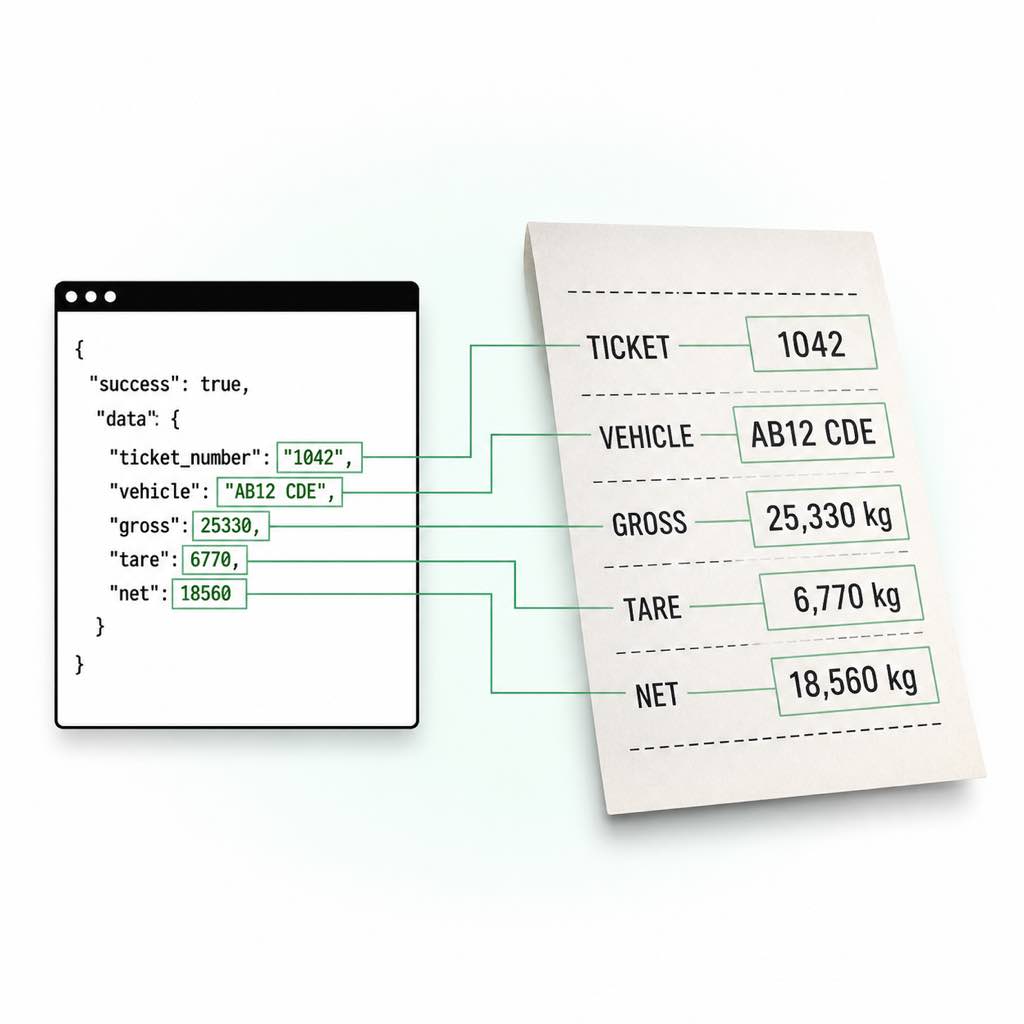
Disposal Tickets Mix Weight and Transaction Data
Dump and disposal tickets often combine inbound and outbound weighing, vehicle and account identifiers, waste or material descriptions, timestamps, operator details, and a tipping or disposal fee. Thermal print, dirt, folds, and photographed tickets make ordinary OCR unreliable. Even when the words are readable, downstream software still needs a clear distinction between weights, parties, fees, and operational identifiers.
Normalize Disposal Records at Intake
StructOCR can classify supported documents as dump_or_disposal_ticket, return the visible transaction fields, and flag incomplete or inconsistent weights. Teams can send the result into a waste-management platform, spreadsheet replacement, or review queue. Test photographed samples with the free dump ticket scanner and use weight validation before accepting the transaction.
Live Demo: Weighbridge Ticket OCR Scanner
No registration required. Upload a file to test the extraction.
Drop files here or click to browse
JPG · PNG · PDF · TIFF · up to 500 files · max 4.5 MB each
No document handy?
Practical Workflows
Transfer Stations
Digitize inbound and outbound weights, vehicle, material, and ticket references.
Landfill Reporting
Aggregate normalized net tonnage while retaining the printed source values.
Fee Reconciliation
Capture printed fee and currency alongside the associated disposal record.
Contractor Audits
Compare submitted tickets with vehicle, job, and date records.
Technical Specs
- Endpoint: POST /v1/weighbridge-ticket
- Authentication: x-api-key request header
- Input: Base64 or data URI in JSON; JPG, PNG, WebP, or PDF
- Maximum decoded size: 4.5MB
- Cost: 2 credits per successful request
- Output: Structured JSON with deterministic weight validation
Key Features
- Disposal classification: Recognizes dump and disposal tickets without forcing unrelated receipts into the schema.
- Two-event timestamps: Captures weigh-in and weigh-out date/time when printed.
- Fee fields: Returns printed fee amount and currency when available.
- Audit-friendly weights: Preserves raw text, numeric values, units, and normalized kilograms.
Send a Ticket to the OCR API
The REST endpoint accepts one Base64-encoded JPG, PNG, WebP, or PDF in the JSON img property. Allow a 60-second client timeout and inspect the validation object before accepting a record.
import base64
import requests

with open("weighbridge-ticket.jpg", "rb") as file:
    image = base64.b64encode(file.read()).decode("ascii")

response = requests.post(
    "https://api.structocr.com/v1/weighbridge-ticket",
    headers={"x-api-key": "YOUR_API_KEY", "Content-Type": "application/json"},
    json={"img": image},
    timeout=60,
)
response.raise_for_status()
result = response.json()
data = result["data"]

print("document_type:", data["document_type"])
print("facility.name:", data["facility"]["name"])
print("vehicle.registration:", data["vehicle"]["registration"])
print("material.description:", data["material"]["description"])
print("weigh_in_datetime:", data["weigh_in_datetime"])
print("weigh_out_datetime:", data["weigh_out_datetime"])
print("fee.amount:", data["fee"]["amount"])
print("weights.net.normalized_kg:", data["weights"]["net"]["normalized_kg"])
Validated JSON Response
A successful response contains extracted evidence and a separate validation decision for downstream automation.
{
  "success": true,
  "data": {
    "is_weighbridge_ticket": true,
    "document_type": "generic_weighbridge_ticket",
    "ticket_number": "1042",
    "facility": {
      "name": "North Yard Scale",
      "address": null,
      "scale_id": "SCALE-2"
    },
    "parties": {
      "supplier": null,
      "customer": "Example Customer"
    },
    "job": {
      "job_number": "JOB-88",
      "order_number": null
    },
    "vehicle": {
      "registration": "AB12 CDE",
      "trailer_registration": null,
      "fleet_number": null,
      "driver_name": null
    },
    "material": {
      "description": "Recycled aggregate",
      "code": "RA20"
    },
    "weights": {
      "gross": {
        "value": 25330,
        "unit": "kg",
        "raw": "25,330 kg",
        "normalized_kg": 25330
      },
      "tare": {
        "value": 6770,
        "unit": "kg",
        "raw": "6,770 kg",
        "normalized_kg": 6770
      },
      "net": {
        "value": 18560,
        "unit": "kg",
        "raw": "18,560 kg",
        "normalized_kg": 18560
      }
    },
    "confidence": "high",
    "is_valid": true,
    "validation": {
      "calculated_net_kg": 18560,
      "difference_kg": 0,
      "weight_check_passed": true,
      "needs_review": false,
      "review_reasons": []
    }
  }
}
Frequently Asked Questions
Can it process landfill and transfer-station tickets?
The supported document family includes dump and disposal tickets. Results depend on image quality and visible printed content, so flagged records should be reviewed.
Does it calculate disposal fees?
No. It extracts a printed fee amount and currency when present. Your billing system remains responsible for rate and fee calculations.
Which files can I submit?
The endpoint accepts Base64-encoded JPG, PNG, WebP, and PDF content up to 4.5MB. Public URLs and multipart uploads are not currently accepted by the REST endpoint.
How much does one successful request cost?
A successful weighbridge ticket extraction costs 2 credits. New accounts receive 200 free credits, enough for up to 100 initial scans.
When is it safe to accept a ticket automatically?
Define the rule in your own workflow. A conservative starting point is to require is_weighbridge_ticket and is_valid to be true, confidence to meet your threshold, and validation.needs_review to be false. Keep a human review route for all other results.
Should I use the REST API or an SDK?
Use the REST API from any backend that can send Base64 JSON. The official Python and Node.js SDKs are convenient when you want local file validation, Base64 encoding, and consistent request handling without writing that plumbing yourself.
Explore More Weighbridge Ticket OCR Solutions
Gross, Tare & Net Weight Extraction with Validation
Extract gross, tare, and net weight from tickets, normalize kg, tonnes, and pounds, and validate printed net against gross minus tare.
Quarry Load Ticket OCR
Extract quarry load ticket data including material, customer, vehicle, job, gross, tare, and net weight. Return validated JSON for aggregate operations.
Scale Ticket OCR API
Extract ticket, vehicle, material, gross, tare, and net weight from scale tickets. Validate weight calculations and return structured JSON through one API.
Convert Weighbridge Slips to JSON
Convert weighbridge slips and scale tickets to structured JSON. Extract nested vehicle, material, gross, tare, net, timestamp, and validation fields.
Weight Ticket Data Extraction API
Automate weight ticket data extraction for ERP and transport workflows. Capture vehicle, material, job, gross, tare, net, timestamps, and validation data.
Technical Comparisons & Integrations
Explore platform integrations and competitive analysis
Add VIN OCR using Cursor in 5 Minutes
Step-by-step guide to integrating the StructOCR VIN scanner API using the Cursor AI code editor. Build automotive and fleet tools rapidly.
Extracting ECR Status & File Numbers: Generic OCR vs. StructOCR Indian Passport API
Learn why generic text extractors fail to capture critical Indian KYC fields like ECR status and File Numbers, and how a specialized API structures this data automatically.
Google Cloud Vision vs. StructOCR API for Shipping Containers
Comparing generic enterprise OCR solutions like Google Cloud Vision against StructOCR's purpose-built API for ISO 6346 shipping container recognition.
Heavy KYC SDKs vs. StructOCR Passport API for Mobile Apps
Discover why modern app developers are abandoning bulky on-device OCR SDKs in favor of lightweight, edge-deployed Passport APIs.
Add Container OCR to Your Lovable.dev App in 5 Minutes
Step-by-step guide to integrating the StructOCR shipping container API into a Lovable.dev app. Build logistics and yard management tools with zero backend.
Add Driver's License OCR to Your Lovable.dev App in 5 Minutes
Step-by-step guide to integrating the StructOCR Driver's License scanner API into a Lovable.dev app. Build car rental and mobility onboarding flows with zero backend.
From tutorial to production in 5 minutes.
You've seen the code. Now get your API key, grab your 200 free credits, and see it work with your own images. No credit card required.