Quarry Load Ticket OCR
Digitize aggregate and quarry tickets with material, customer, job, vehicle, and validated load-weight data in one response.
200 free credits = 100 Weighbridge Ticket scans, no credit card. Then from $5 for 500 credits, pay as you go. See pricing
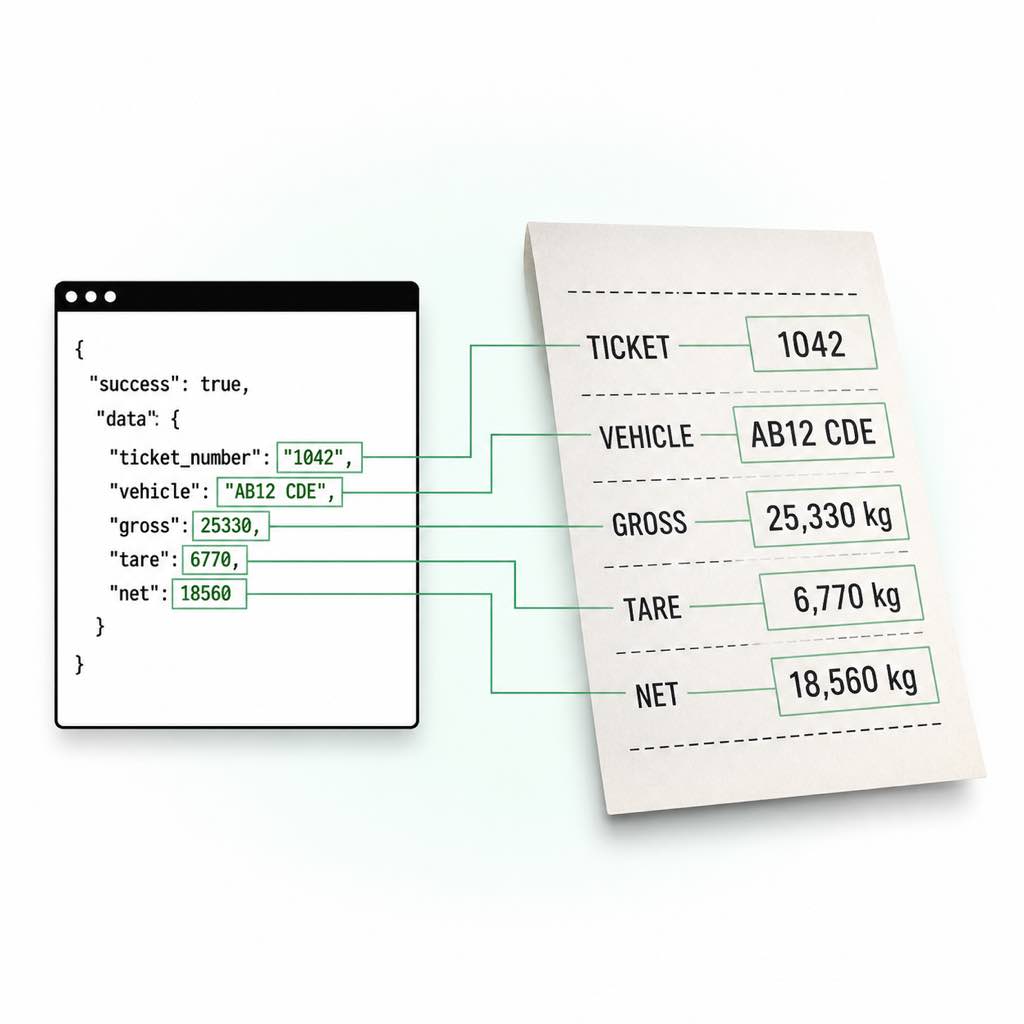
Quarry Tickets Tie Production to Billing
A quarry ticket is simultaneously a scale record, delivery reference, material movement, and billing input. Material descriptions and codes may be abbreviated; customer and job identifiers can appear near the header; gross, tare, and net rows may be printed in different units or sequences. Manual entry creates delays between the scale house, dispatch, production reporting, and accounts receivable.
A Quarry-Aware Load Ticket Workflow
The API can classify a document as quarry_load_ticket and capture the identifiers required to connect the load with downstream systems. It preserves the printed material and weight data while a deterministic validation layer checks gross minus tare. The same scale ticket OCR API works across quarry sites, and the live scanner lets a team evaluate its own layouts before deployment.
Live Demo: Weighbridge Ticket OCR Scanner
No registration required. Upload a file to test the extraction.
Drop files here or click to browse
JPG · PNG · PDF · TIFF · up to 500 files · max 4.5 MB each
No document handy?
Practical Workflows
Aggregate Dispatch
Associate the vehicle and load ticket with a customer, order, and destination workflow.
Production Reporting
Summarize normalized net weight by material code, scale, or facility.
Billing Preparation
Create reviewable transaction records before generating invoices.
Haulier Reconciliation
Compare ticket numbers and net weights with carrier and delivery records.
Technical Specs
- Endpoint: POST /v1/weighbridge-ticket
- Authentication: x-api-key request header
- Input: Base64 or data URI in JSON; JPG, PNG, WebP, or PDF
- Maximum decoded size: 4.5MB
- Cost: 2 credits per successful request
- Output: Structured JSON with deterministic weight validation
Key Features
- Quarry classification: Identifies supported quarry load tickets within the broader ticket family.
- Material extraction: Captures printed material description and code without inventing a mapping.
- Job context: Separates job and order numbers from the ticket identifier.
- Weight control: Exposes normalized values and gross-minus-tare validation for review.
Send a Ticket to the OCR API
The REST endpoint accepts one Base64-encoded JPG, PNG, WebP, or PDF in the JSON img property. Allow a 60-second client timeout and inspect the validation object before accepting a record.
import base64
import requests

with open("weighbridge-ticket.jpg", "rb") as file:
    image = base64.b64encode(file.read()).decode("ascii")

response = requests.post(
    "https://api.structocr.com/v1/weighbridge-ticket",
    headers={"x-api-key": "YOUR_API_KEY", "Content-Type": "application/json"},
    json={"img": image},
    timeout=60,
)
response.raise_for_status()
result = response.json()
data = result["data"]

print("ticket_number:", data["ticket_number"])
print("parties.customer:", data["parties"]["customer"])
print("job.job_number:", data["job"]["job_number"])
print("vehicle.registration:", data["vehicle"]["registration"])
print("material.description:", data["material"]["description"])
print("weights.net.normalized_kg:", data["weights"]["net"]["normalized_kg"])
print("validation.needs_review:", data["validation"]["needs_review"])
Validated JSON Response
A successful response contains extracted evidence and a separate validation decision for downstream automation.
{
  "success": true,
  "data": {
    "is_weighbridge_ticket": true,
    "document_type": "generic_weighbridge_ticket",
    "ticket_number": "1042",
    "facility": {
      "name": "North Yard Scale",
      "address": null,
      "scale_id": "SCALE-2"
    },
    "parties": {
      "supplier": null,
      "customer": "Example Customer"
    },
    "job": {
      "job_number": "JOB-88",
      "order_number": null
    },
    "vehicle": {
      "registration": "AB12 CDE",
      "trailer_registration": null,
      "fleet_number": null,
      "driver_name": null
    },
    "material": {
      "description": "Recycled aggregate",
      "code": "RA20"
    },
    "weights": {
      "gross": {
        "value": 25330,
        "unit": "kg",
        "raw": "25,330 kg",
        "normalized_kg": 25330
      },
      "tare": {
        "value": 6770,
        "unit": "kg",
        "raw": "6,770 kg",
        "normalized_kg": 6770
      },
      "net": {
        "value": 18560,
        "unit": "kg",
        "raw": "18,560 kg",
        "normalized_kg": 18560
      }
    },
    "confidence": "high",
    "is_valid": true,
    "validation": {
      "calculated_net_kg": 18560,
      "difference_kg": 0,
      "weight_check_passed": true,
      "needs_review": false,
      "review_reasons": []
    }
  }
}
Frequently Asked Questions
Does the API support aggregate and quarry ticket layouts?
Yes. Quarry load tickets are a supported classification. Unknown valid layouts can still return the generic weighbridge ticket schema.
Will the API map a material code to my product catalog?
It extracts the printed code and description. Your application should map those values to its own controlled material catalog.
Which files can I submit?
The endpoint accepts Base64-encoded JPG, PNG, WebP, and PDF content up to 4.5MB. Public URLs and multipart uploads are not currently accepted by the REST endpoint.
How much does one successful request cost?
A successful weighbridge ticket extraction costs 2 credits. New accounts receive 200 free credits, enough for up to 100 initial scans.
When is it safe to accept a ticket automatically?
Define the rule in your own workflow. A conservative starting point is to require is_weighbridge_ticket and is_valid to be true, confidence to meet your threshold, and validation.needs_review to be false. Keep a human review route for all other results.
Should I use the REST API or an SDK?
Use the REST API from any backend that can send Base64 JSON. The official Python and Node.js SDKs are convenient when you want local file validation, Base64 encoding, and consistent request handling without writing that plumbing yourself.
Explore More Weighbridge Ticket OCR Solutions
Scale Ticket OCR API
Extract ticket, vehicle, material, gross, tare, and net weight from scale tickets. Validate weight calculations and return structured JSON through one API.
Convert Weighbridge Slips to JSON
Convert weighbridge slips and scale tickets to structured JSON. Extract nested vehicle, material, gross, tare, net, timestamp, and validation fields.
Weight Ticket Data Extraction API
Automate weight ticket data extraction for ERP and transport workflows. Capture vehicle, material, job, gross, tare, net, timestamps, and validation data.
Dump Ticket OCR API
Extract dump and disposal ticket fields including facility, vehicle, material, gross, tare, net weight, fee, and timestamps into validated JSON.
Gross, Tare & Net Weight Extraction with Validation
Extract gross, tare, and net weight from tickets, normalize kg, tonnes, and pounds, and validate printed net against gross minus tare.
Technical Comparisons & Integrations
Explore platform integrations and competitive analysis
AWS Textract vs. StructOCR API for Indian Passport Back Page Extraction
Why generic OCR fails at parsing the back page of Indian passports, and how a dedicated KYC API instantly extracts structured addresses, PIN codes, and family details.
AWS Textract & Google Vision vs. StructOCR Passport API
How AWS Textract AnalyzeID, Google Cloud Vision OCR, and the StructOCR Passport API differ for passport data, quoting each vendor’s own documentation.
Add Container OCR to Your Bolt.new App in 5 Minutes
Step-by-step guide to integrating the StructOCR shipping container API into a Bolt.new app. Build logistics and yard management tools right in your browser.
Add Driver's License OCR to Your Bolt.new App in 5 Minutes
Step-by-step guide to integrating the StructOCR Driver's License scanner API into a Bolt.new app. Build car rental and mobility onboarding flows right in your browser.
Add HIN OCR to Your Bolt.new App in 5 Minutes
Step-by-step guide to integrating the StructOCR HIN (Hull Identification Number) scanner API into a Bolt.new app. Build marine and boat management tools right in your browser.
Invoice OCR API Integration for Bolt.new
Learn how to integrate our Invoice OCR API into a Bolt.new app in under 5 minutes. Extract structured JSON effortlessly. Try our free live test now.
From tutorial to production in 5 minutes.
You've seen the code. Now get your API key, grab your 200 free credits, and see it work with your own images. No credit card required.