Add Our Invoice OCR API to Your Bolt.new App in 5 Minutes
Bolt builds your UI. StructOCR reads the documents. Here's the exact prompt to wire them together. Use the widget below to test our Invoice OCR API live for free.
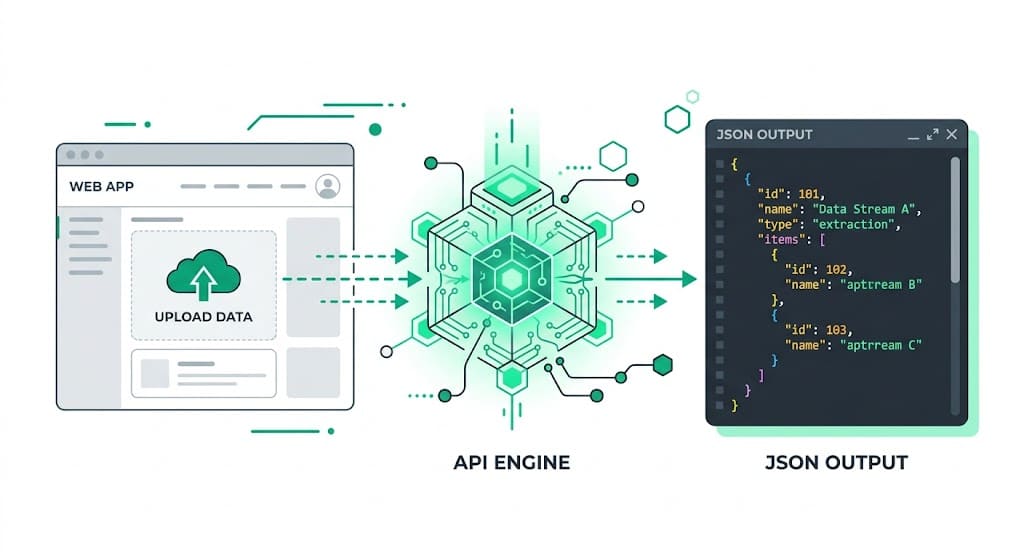
Why Bolt.new + StructOCR is a natural fit
Bolt.new generates full-stack apps instantly from natural language prompts. It handles the UI, backend, and deployment — but extracting structured data from documents like invoices still requires a dedicated invoice OCR API. StructOCR fills exactly that gap: one API call, structured JSON back. Tell Bolt what you want, paste in the fetch code below, and you're done.
The problem: AI builders don't read documents
Tools like Bolt.new are remarkable at generating apps — but they stop at the file boundary. You can build a beautiful invoice upload interface in minutes, yet the actual extraction of vendor names, line items, totals, and dates still requires a dedicated Invoice OCR API. Most teams either skip this feature or spend days integrating a general-purpose vision model that returns unstructured text.
The solution: one API call, structured JSON
StructOCR's /v1/invoice endpoint accepts an image and returns a clean JSON object with every field pre-labeled — no prompting, no parsing, no post-processing. Because it speaks plain HTTP, Bolt.new can wire it up from a single fetch call. You describe what you want, and Bolt writes the code. You can even test our invoice OCR API live for free on this page before writing a single line of code.
Integrate StructOCR in Bolt.new (3 Steps)
Create a Bolt.new project and describe your app
Open bolt.new and start a new project. In the prompt box, describe the app you want to build — be specific about the invoice fields you need.
Try this prompt: "Build an invoice upload app. Users can upload an invoice image and see the vendor name, invoice date, due date, and total amount extracted automatically."Tell Bolt to call the StructOCR API
Once Bolt scaffolds the UI, paste the follow-up prompt below. Bolt will write the fetch call, handle the file upload, and wire the response to your UI components.
Follow-up prompt: "When a user uploads an image, send it as a multipart/form-data POST to https://api.structocr.com/v1/invoice with an Authorization header containing my API key stored in VITE_STRUCTOCR_KEY. Display the returned JSON fields in the results panel."// Bolt.new generates something like this — you just supply the key const response = await fetch('https://api.structocr.com/v1/invoice', { method: 'POST', headers: { Authorization: `Bearer ${import.meta.env.VITE_STRUCTOCR_KEY}` }, body: formData, });Add your StructOCR API key and deploy
Go to Settings → Environment Variables in your Bolt project and add your StructOCR key. Then click Deploy to publish your invoice parser live.
Variable name: VITE_STRUCTOCR_KEY — get your free key at structocr.com/dashboardVITE_STRUCTOCR_KEY=sk_live_xxxxxxxxxxxxxxxx
What you can build in Bolt.new with this integration
- Accounts payable dashboard: Let your team upload supplier invoices and automatically populate a tracker with vendor, amount, and due date — no manual data entry. Perfect for building custom accounts payable automation workflows.
- Freelance invoice manager: Build a personal tool that reads your client invoices, calculates outstanding totals, and exports to CSV — all inside Bolt.new in under an hour.
- Expense approval workflow: Add an upload step to an approval flow: extract invoice details automatically and route for sign-off without any copy-pasting. This is the foundation of modern expense management automation.
- Multi-vendor price comparison: Parse invoices from multiple suppliers and compare line-item pricing side by side — a task that previously required a developer and a parsing library.
The prompt and the code
Copy the Bolt.new prompt into your project chat to generate the integration. The JavaScript tab shows what Bolt produces — useful if you want to verify or customize it.
Prerequisite: A free StructOCR account — get your API key at structocr.com/dashboard (no credit card required)
I need to add invoice OCR to this app.

When a user uploads an image:
1. Send it as multipart/form-data to: POST https://api.structocr.com/v1/invoice
2. Include the header: Authorization: Bearer ${VITE_STRUCTOCR_KEY}
3. The response is JSON with fields: vendor_name, invoice_date, due_date, total_amount, currency, line_items[]
4. Display each field in the results panel below the upload button
5. Show a loading spinner while the request is in flight
6. Show an error message if the upload fails

Use the environment variable VITE_STRUCTOCR_KEY for the API key.
What the API returns
Every field is labeled and typed. Your Bolt.new app can render this directly without any transformation.
{
  "invoice_number": "INV-2024-0891",
  "vendor_name": "Acme Supplies Ltd.",
  "vendor_address": "123 Commerce St, Austin TX 78701",
  "invoice_date": "2024-11-14",
  "due_date": "2024-12-14",
  "currency": "USD",
  "subtotal": 2400,
  "tax": 192,
  "total_amount": 2592,
  "line_items": [
    {
      "description": "Widget Pro (12-pack)",
      "quantity": 4,
      "unit_price": 500,
      "amount": 2000
    },
    {
      "description": "Shipping & Handling",
      "quantity": 1,
      "unit_price": 400,
      "amount": 400
    }
  ],
  "confidence": 0.97
}
Technical Specs
- Formats accepted: PNG, JPG, WEBP — including scanned and photographed invoices
- Response time: typically 1–3 seconds per page
- Languages: English, Spanish, French, German, Chinese, Japanese, and 40+ more
- Max file size: 20 MB per request
- Confidence scores: each field includes an extraction confidence value
Key Features
- Structured output: every field is named and typed — no regex, no parsing
- Line items: products, quantities, unit prices, and subtotals extracted as an array
- Tax and discount: VAT, GST, and discount rows are detected and labeled separately
- Multi-page support: invoices spanning multiple pages are handled in a single call
- Works with photos: blurry or skewed smartphone photos are corrected automatically
Live Demo: Invoice extractor
No registration required. Upload a file to test the extraction.
Drop files here or click to browse
JPG · PNG · PDF · TIFF · up to 500 files · max 4.5 MB each
No document handy?
Frequently Asked Questions
Does StructOCR work inside a Bolt.new app?
Where should I store the StructOCR API key in Bolt.new?
Can Bolt.new call StructOCR without any backend?
What invoice formats does StructOCR support?
How accurate is the invoice extraction?
Is there a free tier to test with?
Can I use this with Lovable, v0, or Replit instead of Bolt.new?
What if my invoice is not in English?
More Tutorials
Add Invoice OCR using Cursor in 5 Minutes
Step-by-step guide to integrating the StructOCR invoice API using the Cursor AI code editor. Build accounts payable and expense tracking tools rapidly.
Add Invoice OCR to Your Lovable.dev App in 5 Minutes
Step-by-step guide to integrating the StructOCR invoice API into a Lovable.dev app. No backend required — just paste a prompt and add your API key.
Add Invoice OCR to Your Replit App in 5 Minutes
Step-by-step guide to integrating the StructOCR invoice API into a Replit application. Build accounts payable and expense tracking tools using Replit Agent and Secrets.
Add Invoice OCR to Your v0 App in 5 Minutes
Step-by-step guide to integrating the StructOCR invoice API into a v0 by Vercel app. Build accounts payable and expense tracking tools with zero backend.
Ready to Build with StructOCR?
Get your API key in under a minute. New users receive 200 free credits to test Passport, VIN, License Plate, Container, Receipt, HIN, Driver License, ID Card, Vehicle Registration, Weighbridge Ticket, ATM Cassette and Invoice OCR APIs.
✓ No credit card required · ✓ Instant API key · ✓ Full API access