Add Invoice OCR to Your v0 App in 5 Minutes
v0 scaffolds your React UI. StructOCR reads the invoices. Here's the exact prompt and API call to wire them together — zero backend required.
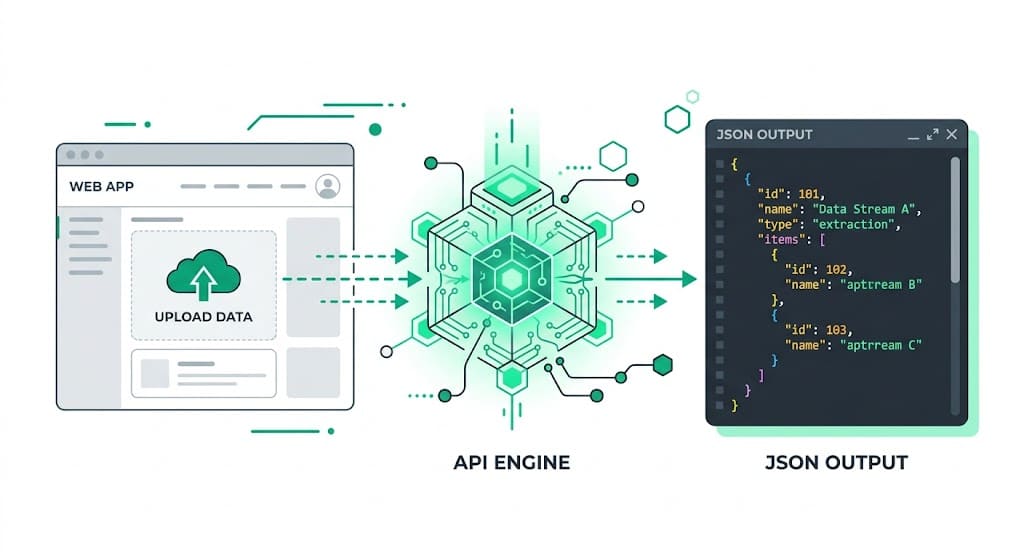
Why v0 + StructOCR is a natural fit
v0 generates beautiful, accessible React interfaces using Tailwind CSS and shadcn/ui directly from plain English. It handles the frontend components perfectly — but document parsing is still something you have to wire up yourself. StructOCR fills exactly that gap: one API call, structured JSON back. Tell v0 what you want, paste in the fetch code below, and you're done.
The problem: AI builders don't read documents
Tools like v0 are remarkable at generating UIs instantly — but they stop at the file boundary. You can build a beautiful invoice upload interface in minutes, yet the actual extraction of vendor names, line items, totals, and dates still requires a dedicated Invoice OCR API. Most teams either skip this feature or spend days integrating a general-purpose vision model that returns unstructured text.
The solution: one API call, structured JSON
StructOCR's /v1/invoice endpoint accepts an image and returns a clean JSON object with every field pre-labeled — no prompting, no parsing, no post-processing. Because it speaks plain HTTP, v0 can wire it up from a single fetch call.
Integrate StructOCR in v0 (3 Steps)
Create a v0 project and describe your app
Open v0.dev and start a new prompt. Describe the app you want to build — be specific about the invoice fields you need.
Try this prompt: "Build an invoice upload UI using shadcn. Users can upload an invoice image and see the vendor name, invoice date, due date, and total amount extracted automatically in a clean card."Tell v0 to call the StructOCR API
Once v0 scaffolds the UI, paste the follow-up prompt below. v0 will update the React code to handle the file upload and wire the API response to your UI components.
Follow-up prompt: "When a user uploads an image, send it as a multipart/form-data POST to https://api.structocr.com/v1/invoice with an Authorization header containing my API key. Display the returned JSON fields in the results panel."// v0 generates something like this in your React component const response = await fetch('https://api.structocr.com/v1/invoice', { method: 'POST', headers: { Authorization: `Bearer ${process.env.NEXT_PUBLIC_STRUCTOCR_KEY}` }, body: formData, });Add your StructOCR API key
When you export your v0 project to a Next.js codebase or deploy to Vercel, simply add your StructOCR key to your .env.local file or Vercel Environment Variables.
Variable name: NEXT_PUBLIC_STRUCTOCR_KEY — get your free key at structocr.com/dashboardNEXT_PUBLIC_STRUCTOCR_KEY=sk_live_xxxxxxxxxxxxxxxx
What you can build in v0 with this integration
- Accounts payable dashboard: Let your team upload supplier invoices and automatically populate a tracker with vendor, amount, and due date — no manual data entry. Perfect for building custom accounts payable automation workflows.
- Freelance invoice manager: Build a personal tool that reads your client invoices, calculates outstanding totals, and exports to CSV — all inside v0 in under an hour.
- Expense approval workflow: Add an upload step to an approval flow: extract invoice details automatically and route for sign-off without any copy-pasting. This is the foundation of modern expense management automation.
- Multi-vendor price comparison: Parse invoices from multiple suppliers and compare line-item pricing side by side — a task that previously required a developer and a parsing library.
The prompt and the code
Copy the follow-up prompt into your v0 chat to generate the integration. The code block shows what v0 typically produces — useful if you want to verify or customize it.
Prerequisite: A free StructOCR account — get your API key at structocr.com/dashboard (no credit card required)
I need to add invoice OCR to this app.

When a user uploads an image:
1. Send it as multipart/form-data to: POST https://api.structocr.com/v1/invoice
2. Include the header: Authorization: Bearer ${process.env.NEXT_PUBLIC_STRUCTOCR_KEY}
3. The response is JSON with fields: vendor_name, invoice_date, due_date, total_amount, currency, line_items[]
4. Display each field in the results panel below the upload button
5. Show a loading spinner while the request is in flight
6. Show an error message if the upload fails

Use the environment variable NEXT_PUBLIC_STRUCTOCR_KEY for the API key.
What the API returns
Every field is labeled and typed. Your v0 React components can bind this directly to the UI without any transformation.
{
  "invoice_number": "INV-2024-0891",
  "vendor_name": "Acme Supplies Ltd.",
  "vendor_address": "123 Commerce St, Austin TX 78701",
  "invoice_date": "2024-11-14",
  "due_date": "2024-12-14",
  "currency": "USD",
  "subtotal": 2400,
  "tax": 192,
  "total_amount": 2592,
  "line_items": [
    {
      "description": "Widget Pro (12-pack)",
      "quantity": 4,
      "unit_price": 500,
      "amount": 2000
    },
    {
      "description": "Shipping & Handling",
      "quantity": 1,
      "unit_price": 400,
      "amount": 400
    }
  ],
  "confidence": 0.97
}
Technical Specs
- Formats accepted: PNG, JPG, WEBP — including scanned and photographed invoices
- Response time: typically 1–3 seconds per page
- Languages: English, Spanish, French, German, Chinese, Japanese, and 40+ more
- Max file size: 20 MB per request
- Confidence scores: each field includes an extraction confidence value
Key Features
- Structured output: every field is named and typed — no regex, no parsing
- Line items: products, quantities, unit prices, and subtotals extracted as an array
- Tax and discount: VAT, GST, and discount rows are detected and labeled separately
- Multi-page support: invoices spanning multiple pages are handled in a single call
- Works with photos: blurry or skewed smartphone photos are corrected automatically
Live Demo: Invoice extractor
No registration required. Upload a file to test the extraction.
Drop files here or click to browse
JPG · PNG · PDF · TIFF · up to 500 files · max 4.5 MB each
No document handy?
Frequently Asked Questions
Does StructOCR work inside a v0 app?
Where should I store the StructOCR API key in v0?
Can v0 call StructOCR without any backend?
What invoice formats does StructOCR support?
How accurate is the invoice extraction?
Is there a free tier to test with?
Can I use this with Lovable, Bolt.new, or Replit instead of v0?
What if my invoice is not in English?
More Tutorials
Add Container OCR to Your v0 App in 5 Minutes
Step-by-step guide to integrating the StructOCR shipping container API into a v0 by Vercel app. Build logistics and yard management tools with zero backend.
Add Driver's License OCR to Your v0 App in 5 Minutes
Step-by-step guide to integrating the StructOCR Driver's License scanner API into a v0 by Vercel app. Build car rental and mobility onboarding flows with zero backend.
Add HIN OCR to Your v0 App in 5 Minutes
Step-by-step guide to integrating the StructOCR HIN (Hull Identification Number) scanner API into a v0 by Vercel app. Build marine and boat management tools with zero backend.
Add National ID OCR to Your v0 App in 5 Minutes
Step-by-step guide to integrating the StructOCR National ID scanner API into a v0 by Vercel app. Build KYC and identity verification flows with zero backend.
Ready to Build with StructOCR?
Get your API key in under a minute. New users receive 200 free credits to test Passport, VIN, License Plate, Container, Receipt, HIN, Driver License, ID Card, Vehicle Registration, Weighbridge Ticket, ATM Cassette and Invoice OCR APIs.
✓ No credit card required · ✓ Instant API key · ✓ Full API access