El Corral Gourmet Receipt OCR (Colombia)
Convert El Corral Gourmet receipts from Colombia into structured merchant, date, item, tax and total fields, with checks for ambiguous amounts.
200 free credits = 200 Receipt scans, no credit card. Then from $5 for 500 credits, pay as you go. See pricing
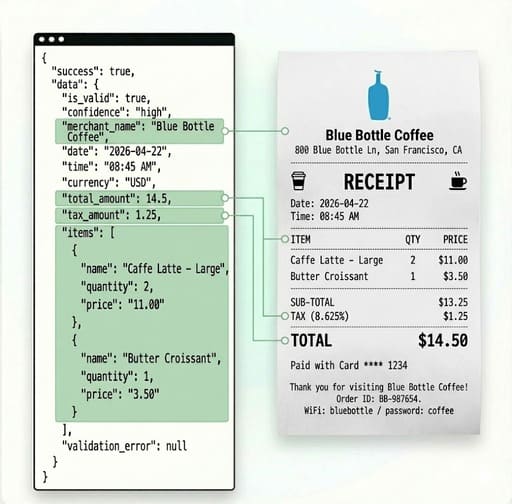
Reading a El Corral Gourmet receipt from Colombia
The sample includes food modifiers, consumption tax and a separate service/tip amount. Read the final total without misclassifying propina as tax. This guide is scoped to Colombia. Store, checkout and document versions can vary; the merchant name is a search context, not a promise that every receipt has one fixed layout. A successful read of the header is not enough: the amount beside the final payable label and the boundaries of individual item rows are the evidence that makes a useful expense record.
Extract receipt fields without inventing a breakdown
Use the receipt OCR API for merchant_name, date, time, currency, total_amount, tax_amount and items. Each item exposes name, quantity and price; price is the whole-row amount, not necessarily a unit price. The public schema has no dedicated tender, tip, loyalty, QR payload or receipt-number object. Keep the source document when those details matter. Related format guides: Colombia receipt formatting.
Live Demo: Receipt scanner
No registration required. Upload a file to test the extraction.
Drop files here or click to browse
JPG · PNG · PDF · TIFF · up to 500 files · max 4.5 MB each
No document handy?
From receipt image to an expense record
Check the document-specific layout
The sample includes food modifiers, consumption tax and a separate service/tip amount. Read the final total without misclassifying propina as tax.
Save the purchase once
Associate the image with an application-generated receipt ID. A payment slip and an itemized receipt can describe the same purchase; merchant, date and amount can support a duplicate review but are not a universally unique key.
Export item rows to CSV or Excel
Create one row per returned item and repeat the parent receipt ID, merchant and date. Sum price only where it represents a resolved row amount; do not multiply it by quantity again.
Route uncertain records for review
Inspect success, is_valid, status, issues and confidence before accepting the extracted data. Keep unresolved quantities or totals unresolved. An HTTP success code does not establish that every amount is readable.
Technical Specs
- Endpoint: POST /v1/receipt
- Authentication: Server-side x-api-key header
- Input: Base64 image in JSON img; use a readable JPG, PNG or WebP for this example
- File size: Up to 4.5MB decoded
- Standard processing: 1 credit per scan
- Output: JSON; retain incomplete results for review
Key Features
- Specific concern: The sample includes food modifiers, consumption tax and a separate service/tip amount. Read the final total without misclassifying propina as tax.
- Money: Resolve separators from the full receipt; a dollar sign or a familiar brand is insufficient currency evidence.
- Tax: Read explicit monetary tax values, excluding bases, rates and tips. Included tax is not added to the total again.
- Items: Keep wrapped descriptions and count-at-price lines associated with their own row.
- Payment: Cash tendered, change, account balance and an authorization reference are not substitutes for a final sale total.
Read a receipt from a Python backend
Submit one receipt image using the standard endpoint. Keep the API key server-side and examine quality indicators before mapping the result to an expense. The sample does not claim a live test on this merchant.
import base64
import os
import requests

with open("receipt.jpg", "rb") as source:
    encoded = base64.b64encode(source.read()).decode("ascii")

response = requests.post(
    "https://api.structocr.com/v1/receipt",
    headers={"x-api-key": os.environ["STRUCTOCR_API_KEY"]},
    json={"img": encoded},
    timeout=60,
)
response.raise_for_status()
result = response.json()
if not result.get("success"):
    raise RuntimeError("Extraction was not successful; inspect the response securely")
data = result.get("data") or {}
needs_review = (
    not data.get("is_valid")
    or data.get("status") != "complete"
    or bool(data.get("issues"))
    or data.get("confidence") == "low"
)
# Persist through your own storage layer; avoid logging receipt contents.
print({"needs_review": needs_review, "item_count": len(data.get("items") or [])})
Synthetic receipt JSON example
Illustrative values only, not output from a local sample or a merchant benchmark. Item price is a line amount. Currency must be resolved from the submitted receipt rather than hard-coded from this example.
{
  "success": true,
  "data": {
    "response_version": 2,
    "is_valid": true,
    "merchant_name": "El Corral Gourmet",
    "date": "2026-09-01",
    "time": "12:30",
    "currency": "COP",
    "total_amount": 12,
    "tax_amount": 1,
    "items": [
      {
        "name": "MEAL",
        "quantity": 2,
        "price": "8.00"
      },
      {
        "name": "DRINK",
        "quantity": 1,
        "price": "3.00"
      }
    ],
    "confidence": "high",
    "validation_error": null,
    "status": "complete",
    "issues": []
  }
}
Frequently Asked Questions
What should I check on a El Corral Gourmet receipt?
The sample includes food modifiers, consumption tax and a separate service/tip amount. Read the final total without misclassifying propina as tax.
Can I extract a detailed payment or tax breakdown?
The receipt API exposes total_amount and tax_amount, but not a structured tender array or tax-rate breakdown. Keep the source and use a separate reviewed mapping when those details are required.
How do I prevent duplicate expenses?
Keep an application receipt ID and compare candidate duplicates using merchant, date and amount, with source review for ambiguous matches. Deduplication is application logic, not a claim made by this extraction endpoint.
Can I use the output in a spreadsheet?
Yes. Map returned fields to your own CSV or Excel columns. Treat price as the item row amount and preserve missing or unresolved values; do not turn an empty amount into zero.
Is this a tested accuracy claim or a merchant affiliation?
No. This is an integration guide. Layouts and image quality vary; evaluate representative receipts from your workflow. Merchant names describe the documents discussed and do not imply affiliation.
Explore More Receipt Solutions
EV Charging Receipt OCR
Convert ev charging receipt into structured merchant, date, item, tax and total fields, with checks for ambiguous amounts.
Éxito Receipt OCR (Colombia)
Convert Éxito receipts from Colombia into structured merchant, date, item, tax and total fields, with checks for ambiguous amounts.
Faded and Folded Receipt OCR
Convert faded and folded receipt into structured merchant, date, item, tax and total fields, with checks for ambiguous amounts.
FairPrice Receipt OCR (Singapore)
Convert FairPrice receipts from Singapore into structured merchant, date, item, tax and total fields, with checks for ambiguous amounts.
FamilyMart Receipt OCR (Japan)
Convert FamilyMart receipts from Japan into structured merchant, date, item, tax and total fields, with checks for ambiguous amounts.
Fuel Station Receipt OCR
Convert fuel station receipt into structured merchant, date, item, tax and total fields, with checks for ambiguous amounts.
Home Depot Receipt OCR (United States)
Convert Home Depot receipts from United States into structured merchant, date, item, tax and total fields, with checks for ambiguous amounts.
Hotel Stay Receipt OCR
Convert hotel stay receipt into structured merchant, date, item, tax and total fields, with checks for ambiguous amounts.
Indomaret Receipt OCR (Indonesia)
Convert Indomaret receipts from Indonesia into structured merchant, date, item, tax and total fields, with checks for ambiguous amounts.
Juan Valdez Receipt OCR (Colombia)
Convert Juan Valdez receipts from Colombia into structured merchant, date, item, tax and total fields, with checks for ambiguous amounts.
Technical Comparisons & Integrations
Explore platform integrations and competitive analysis
Add Receipt OCR to Your Bolt.new App in 5 Minutes
Step-by-step guide to integrating the StructOCR receipt API into a Bolt.new app. Build expense tracking and receipt scanning tools right in your browser.
Add Receipt OCR using Cursor in 5 Minutes
Step-by-step guide to integrating the StructOCR receipt API using the Cursor AI code editor. Build expense tracking and receipt scanning tools rapidly.
Add Receipt OCR to Your Lovable.dev App in 5 Minutes
Step-by-step guide to integrating the StructOCR receipt API into a Lovable.dev app. No backend required — just paste a prompt and add your API key.
Add Receipt OCR to Your Replit App in 5 Minutes
Step-by-step guide to integrating the StructOCR receipt API into a Replit application. Build expense tracking and receipt scanning tools using Replit Agent and Secrets.
Add Receipt OCR to Your v0 App in 5 Minutes
Step-by-step guide to integrating the StructOCR receipt API into a v0 by Vercel app. Build expense tracking and receipt scanning tools right in your browser.
AWS Textract & Google Vision vs. StructOCR Passport API
How AWS Textract AnalyzeID, Google Cloud Vision OCR, and the StructOCR Passport API differ for passport data, quoting each vendor’s own documentation.
From tutorial to production in 5 minutes.
You've seen the code. Now get your API key, grab your 200 free credits, and see it work with your own images. No credit card required.