Railway Portals: Container OCR API
Track intermodal freight at full speed. Upload your local trackside captures to test our extraction accuracy for free, effortlessly handling motion blur and stacked well cars.
200 free credits = 200 Container scans, no credit card. Then from $5 for 500 credits, pay as you go. See pricing
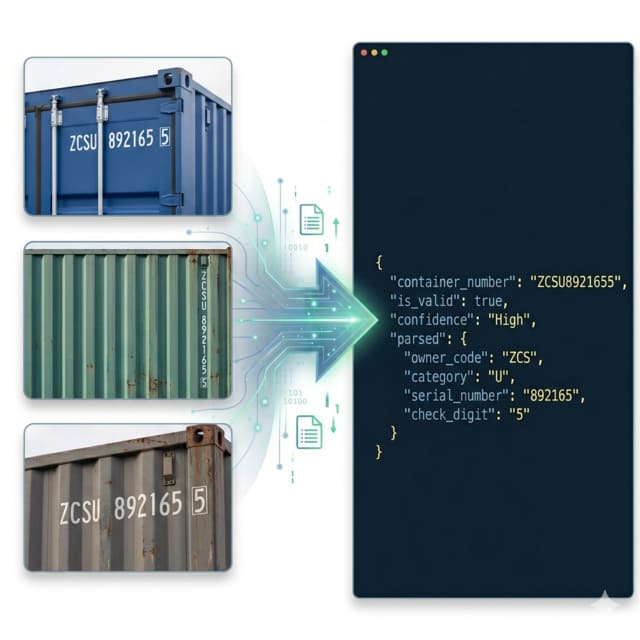
The Speed and Motion Blur Bottleneck
Capturing container codes on moving freight trains presents severe optical challenges. As intermodal trains pass through trackside portals at speed, cameras suffer from significant motion blur and rolling shutter effects. Additionally, double-stacked well-cars create complex visual backgrounds. Standard OCR fails to keep up with the continuous frame rate, causing missing data in your railway manifest. To see how our engine cuts through these extreme dynamic challenges, you can upload a test image to explore our core Container OCR capabilities completely free.
High-Speed Extraction via Edge API
Delivered strictly as a high-throughput REST API to ensure seamless integration into any railway portal system without heavy SDK dependencies, this endpoint is powered by our Logistics Container OCR engine. It utilizes advanced deep-learning filters specifically tuned to reconstruct characters distorted by motion blur. The engine applies strict ISO 6346 validation on the fly, instantly calculating check digits to guarantee perfect data integrity before passing the railcar manifest to your intermodal operating system.
Live Demo: Container OCR
No registration required. Upload a file to test the extraction.
Drop files here or click to browse
JPG · PNG · PDF · TIFF · up to 500 files · max 4.5 MB each
No document handy?
Railway & Intermodal Scenarios
High-Speed Portal Scanning
Process inbound and outbound trains without slowing them down. Accurately identify ISO 6346 container codes at track speeds up to 60 km/h. Ready to scale your rail network? View flexible pricing to secure maximum processing limits for continuous video frame extraction.
Double-Stack Well Car Tracking
Natively handle complex railcar configurations. The API perfectly isolates text from both top and bottom containers without confusing the sequences.
Rail Yard Inventory Management
Automatically reconcile physical train arrivals with digital EDI manifests, instantly flagging missing or unexpected containers on the consist.
Customs & Border Crossings
Accelerate cross-border freight rail clearance by transmitting perfectly validated container sequences to customs authorities before the train even stops.
Technical Specs
- Motion Tolerance: Algorithms specifically tuned to mitigate severe motion blur and rolling shutter effects from high-speed trains passing trackside scanners.
- High-Throughput Concurrency: Robust architecture supports continuous burst API calls from multiple trackside cameras capturing a fast-moving train without throttling.
- Input Versatility: Fully supports raw Base64 strings, direct multipart file uploads, and public image URLs—ideal for offline-first edge servers on the railway network.
- Error Correction: Built-in ISO 6346 checksum verification acts as a powerful error-correction tool to mathematically verify codes distorted by speed.
Key Features
- Free Image Testing: Instantly upload highly blurred images from your actual train portals to test extraction accuracy before writing any integration code.
- Standardized Output: Returns a unified `container_number` string while perfectly isolating the 3-letter Owner Code, 1-letter Category, 6-digit Serial, and Check Digit in a parsed object.
- Stack Separation: Advanced visual parsing cleanly separates text from double-stacked well cars, ensuring containers are assigned to the correct tier.
Integration & AI Prompts
Call the endpoint directly via HTTP. The API flexibly accepts standard image URLs, direct multipart file uploads, or Base64-encoded strings, making it perfect for edge-computing gateways installed trackside.
import requests
import base64

# Prepare Base64 Image from trackside portal camera
with open("train_portal_cam_3.jpg", "rb") as image_file:
    base64_image = base64.b64encode(image_file.read()).decode('utf-8')

url = "https://api.structocr.com/v1/container"
headers = {
    "x-api-key": "YOUR_API_KEY",
    "Content-Type": "application/json"
}
payload = {
    "img": base64_image
}

try:
    print("Scanning Railway Capture...")
    response = requests.post(url, headers=headers, json=payload)
    result = response.json()

    if result.get('success'):
        data = result['data']
        print("✅ Container Code Extracted!")
        print(f"Full Number:  {data.get('container_number')}")
        print(f"Valid ISO:    {data.get('is_valid')}")
        print(f"Confidence:   {data.get('confidence')}")
    else:
        print(f"❌ Extraction Failed: {result.get('error')} - {result.get('message')}")

except Exception as e:
    print(f"An error occurred: {e}")
Standardized JSON Output
The API returns a cleanly parsed payload providing the full consolidated container number, validating the check digit, and breaking down the ISO 6346 components.
{
  "success": true,
  "data": {
    "container_number": "ZCSU8921655",
    "is_valid": true,
    "confidence": "High",
    "parsed": {
      "owner_code": "ZCS",
      "category": "U",
      "serial_number": "892165",
      "check_digit": "5"
    }
  }
}
Frequently Asked Questions
Can I test the API with images from our trackside cameras for free?
Absolutely. You can upload photos directly on our platform to test how the OCR engine handles your specific motion blur, lighting, and camera angles completely free of charge.
How does the API handle the motion blur of moving trains?
We utilize specialized deep-learning models trained specifically on high-speed vehicular captures, allowing the engine to reconstruct and read characters that appear stretched or blurred to the human eye.
Do we need to expose our rail portal images to public URLs?
No. The API natively accepts direct file uploads and Base64-encoded strings directly from your local edge servers or trackside gateways, ensuring sensitive freight data remains secure.
Explore More Container Solutions
Container OCR API UAE
High-accuracy ISO 6346 container extraction for Dubai and UAE ports. Overcome extreme sun glare and sandstorms. Upload an image for a free test today.
Container OCR API UK
High-accuracy container number extraction for UK ports and rail hubs. Overcome heavy rain and automate customs clearance. Upload an image for a free test.
Container OCR API USA
Automate US port gates and intermodal yards with our high-throughput Container OCR API. Upload a challenging image for a free accuracy test today.
Container OCR API for Weighbridge
Automate weighbridge data entry with our Container OCR API. Upload scale camera captures to test our ISO 6346 extraction for free. Eliminate manual logging and truck delays.
Container OCR System Provider Guide
Evaluating a container OCR system provider? Compare our high-concurrency API infrastructure. Upload your image for a free test to see our extraction accuracy.
Intermodal Rail OCR API North America
Automate high-speed intermodal rail scanning across North America. Extract container numbers from moving trains natively. Upload your image for a free test.
ISO 6346 OCR API
Parse and validate ISO 6346 container codes with our high-accuracy OCR API. Upload images to test extraction and automatic check-digit calculation for free.
Shipping Container Number Scanner API
Looking for a shipping container number scanner? Turn any mobile device or CCTV camera into an industrial container scanner via our REST API. Upload an image for a free test.
BIC Code OCR API
Extract BIC Owner Codes from shipping containers instantly. Upload your images to test our high-accuracy BIC Code OCR API for free and automate equipment tracking.
How to Build a Container Recognition Scanner
Step-by-step developer guide on how to build a custom container recognition scanner using a lightweight API. Test your image payloads for free today.
Technical Comparisons & Integrations
Explore platform integrations and competitive analysis
Add Container OCR to Your v0 App in 5 Minutes
Step-by-step guide to integrating the StructOCR shipping container API into a v0 by Vercel app. Build logistics and yard management tools with zero backend.
Add Container OCR to Your Bolt.new App in 5 Minutes
Step-by-step guide to integrating the StructOCR shipping container API into a Bolt.new app. Build logistics and yard management tools right in your browser.
Add Container OCR using Cursor in 5 Minutes
Step-by-step guide to integrating the StructOCR shipping container API using the Cursor AI code editor. Build logistics and yard management tools rapidly.
Google Cloud Vision vs. StructOCR API for Shipping Containers
Comparing generic enterprise OCR solutions like Google Cloud Vision against StructOCR's purpose-built API for ISO 6346 shipping container recognition.
Add Container OCR to Your Lovable.dev App in 5 Minutes
Step-by-step guide to integrating the StructOCR shipping container API into a Lovable.dev app. Build logistics and yard management tools with zero backend.
Manual TOS Entry vs. Container OCR Automation API
Analyzing the ROI and operational efficiency of replacing manual gate checkers with an automated Container OCR API in logistics yards.
From tutorial to production in 5 minutes.
You've seen the code. Now get your API key, grab your 200 free credits, and see it work with your own images. No credit card required.